

Use of the payroll template is budget friendly solution for all payroll related problems and issues that lets a business organization to reward employees and workers accurately in time. It is the best alternative to all costly software and computer programs that a small business or company cannot afford due to short budget and financial resources. Payroll can be described as a sum of money that a business establishment or employer will pay to its employees and workers on a particular date or time as compensation of their efforts made for the business. It is usually prepared by the accounting department of company. Related templates: salary certificate templates, job description templates, income statement templates and balance sheet templates.
What Is Payroll?
Payroll is the process of calculating and paying employees for their work. It covers recording hours or salaries, working out gross pay, subtracting deductions such as taxes and benefits, paying the net amount and keeping records of every pay run. A payroll template organizes these figures in one place, which is especially useful for small businesses that run payroll themselves.
More about payroll template
Aside from the nature and scope, every business or company should have a payroll system at place because it not only calculates the total of salaries to be paid by the employer but also keeps a proper track of money that has been paid by the company till now. It automatically calculates the wages and salaries of employees and also makes the process of salary payment simpler for the management. Employee time sheet and other necessary information must be included in the system precisely in order to get accurate calculation of salaries.
Payroll is an important system of process that involves everything that has to do with the payment of employees and also helps the company a lot in preparing employment taxes and other documents. Once all employee payment related factors such as working hours, leave details, overtime working and other benefits offered by the company are successfully added in the payroll system, it will provide you a figure that you must pay to all your employees at the end of week or month. Payroll template is the best tool for small businesses and companies for accurate payroll calculations.
Payroll Template in Excel
A payroll template in Excel is the most practical format, because spreadsheets can calculate pay automatically. You enter each employee’s hours, rate and deductions, and formulas work out gross pay, total deductions and net pay. Separate sheets can hold an employee list, each pay period and a year-to-date summary. Word versions are better suited to printed payroll summaries or pay slips once the numbers have been calculated.
What to Include in a Payroll Template
A basic payroll register or payroll spreadsheet usually includes:
- Employee details: name, employee ID, job title or department, and pay type (hourly or salary).
- Pay period: start date, end date and payment date.
- Hours: regular hours, overtime hours and any paid leave.
- Pay rates: hourly rate, overtime rate or salary amount.
- Gross pay: total earnings before deductions, including bonuses or commission.
- Deductions: income tax, social security or national insurance contributions, pension or retirement contributions, health insurance and any other agreed deductions.
- Net pay: the amount actually paid to the employee.
- Employer costs: employer contributions, if you want to see the total cost of payroll.
- Year-to-date totals for earnings and deductions.
How to Use a Payroll Template
Start by setting up an employee list with each person’s pay type, rate and standard deductions. For each pay period, copy a blank sheet and enter hours worked from time sheets, along with overtime, leave and any one-off payments such as bonuses.
Check that the formulas calculate gross pay, deductions and net pay correctly, and review any unusual figures before paying. After payment, save the completed sheet, update the year-to-date totals and keep a backup. Many employers also produce a pay slip for each employee from the same data.
Tax rates, contribution rules and minimum wage requirements depend on your country and sometimes your state or region, and they can change. Always use the current official rates rather than relying on figures stored in an old template.
Common Payroll Schedules
Employers usually pay staff on a regular schedule, such as weekly, every two weeks, twice a month or monthly. The right choice depends on your industry, your employees’ expectations and any rules that apply where you operate. Whatever schedule you choose, keep it consistent, because pay periods affect overtime calculations, deduction amounts and year-to-date totals. A payroll template with one sheet per pay period makes it easy to follow the schedule and look back at earlier pay runs when an employee has a question.
Payroll Register vs. Pay Stub
A payroll register summarizes every employee’s pay for a period in one table, which is useful for the business’s records and accounting. A pay stub or pay slip is the individual statement given to each employee, showing their own earnings, deductions and net pay for that period.
Tips for Accurate Payroll
- Keep time sheets and leave records up to date before each pay run.
- Lock or protect formula cells so they are not overwritten by mistake.
- Double-check new employees, rate changes and overtime.
- Use the same pay period structure every time.
- Store payroll files securely, because they contain personal and financial information.
- Keep records for as long as required where you operate.
These payroll templates are a general record-keeping aid and are not tax, legal or financial advice. Payroll rules vary by jurisdiction, so confirm current requirements with an accountant, payroll professional or the relevant government agency. As your team grows, dedicated payroll software or a payroll provider may be more suitable.
Downloadable Payroll Templates And Formats
Below are free payroll templates in Word and Excel, including a payroll register, a weekly payroll calculator, a monthly payroll sheet, a pay stub and a payroll deduction authorization form. Download a payroll template, enter your employees and current rates, and check the calculations before each pay run.
Payroll Register Template (Excel)
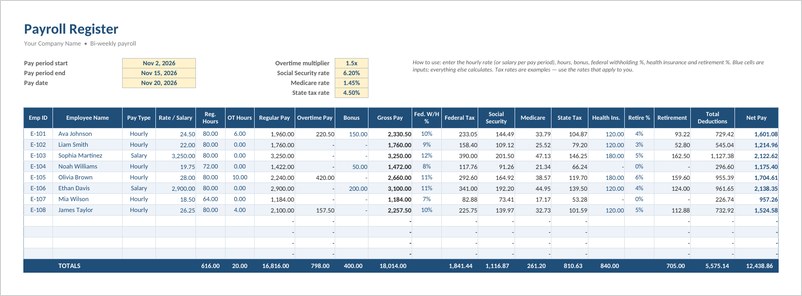
An Excel payroll register for up to 12 employees with hourly and salary pay, overtime, bonus, tax and benefit deductions, net pay and pay period totals.

Weekly Payroll Calculator (Excel)
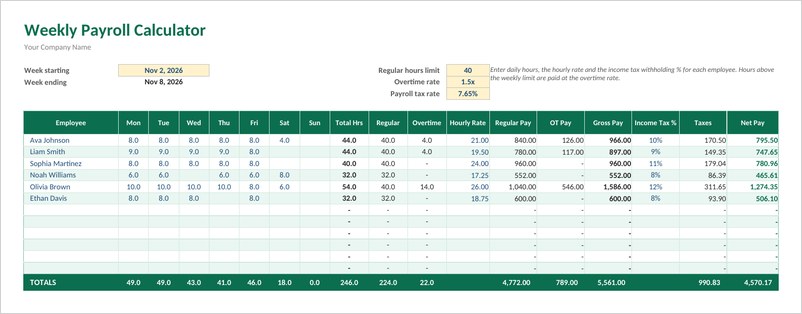
A weekly payroll calculator that turns daily hours into regular and overtime pay, taxes and net pay, with a printable pay stub sheet for each employee.
Monthly Payroll Template (Excel)
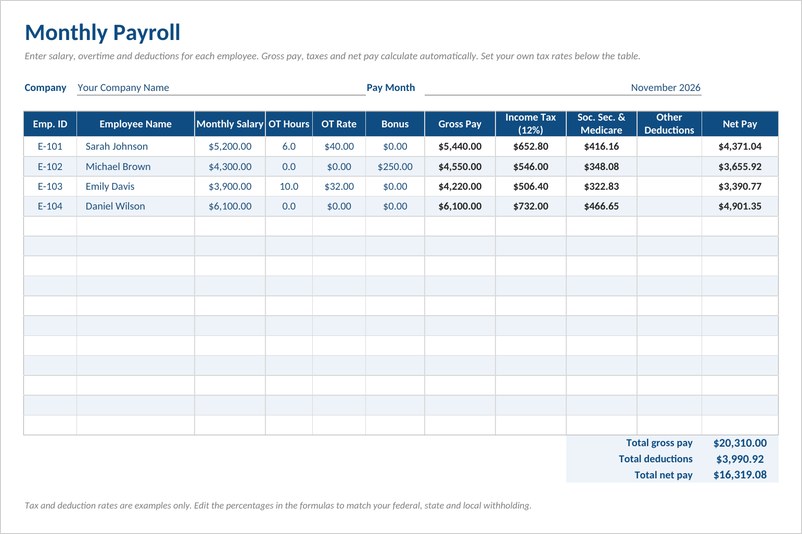
A monthly payroll sheet in Excel for salaried staff with overtime and bonus, automatic gross pay, sample income tax and payroll tax deductions and net pay totals.
Pay Stub Template (Excel)
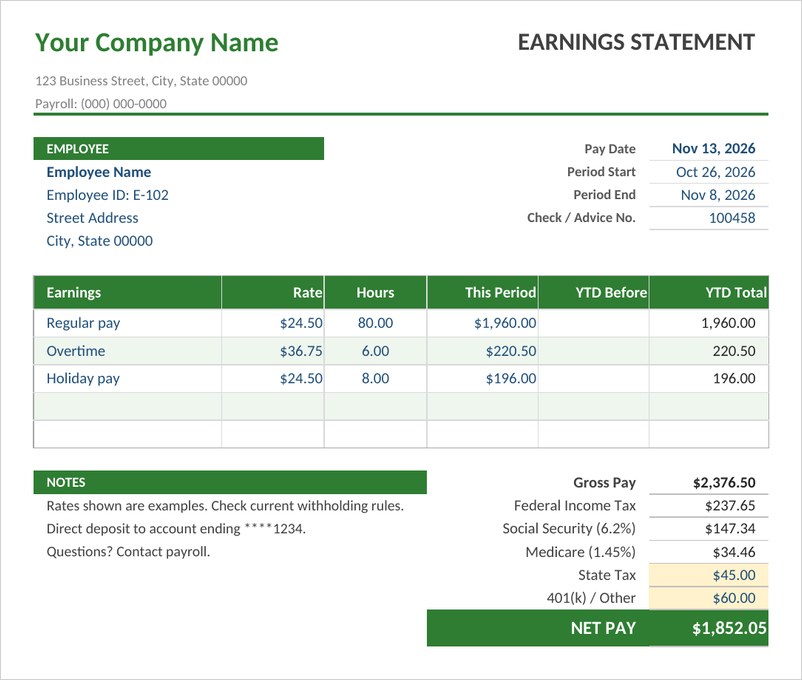
An Excel pay stub with pay period dates, regular, overtime and holiday earnings, year to date totals, tax and benefit deductions and a highlighted net pay.
Payroll Deduction Authorization Form (Word)
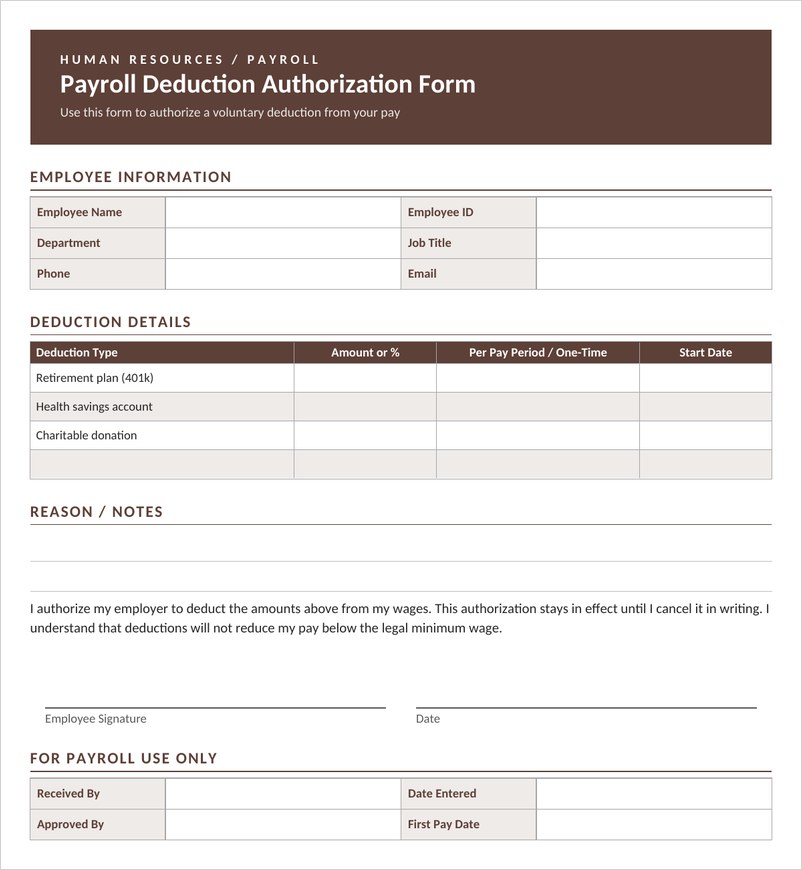
A payroll deduction authorization form in Word where employees list voluntary deductions, amounts and start dates, sign their consent and payroll records approval.
Frequently Asked Questions
What is a payroll template?
A payroll template is a ready-made spreadsheet or document for recording employee hours, pay rates, gross pay, deductions and net pay for each pay period.
Can I run payroll in Excel?
Many small businesses use Excel to calculate payroll. Make sure the formulas and tax rates are correct and current, and keep secure backups.
What deductions are included in payroll?
Common deductions include income tax, social security or national insurance contributions, retirement contributions and health insurance. The exact deductions depend on local law and employee agreements.
What is the difference between gross pay and net pay?
Gross pay is total earnings before deductions. Net pay is the amount the employee receives after deductions.
Is a payroll template enough for a growing business?
It can work for a small team, but as the number of employees grows, payroll software or a payroll service can reduce errors and help with filing requirements.


You must be logged in to post a comment.