

Use these company profile templates to introduce a business with company-profile layouts. Compare 9 downloads below, then choose the file that fits your task.
Choose a Download
| Resource | Format | Download |
|---|---|---|
| Example of Company Profile | Word (ZIP) | Download Example of Company Profile |
| Template for Company Profile | Word (ZIP) | Download Template for Company Profile |
| Company Profile Form | Word (ZIP) | Download Company Profile Form |
| Company Profile Sample in Doc | Word (ZIP) | Download Company Profile Sample in Doc |
| IT Business Company Profile | Word (ZIP) | Download IT Business Company Profile |
| Contractor Sample Company Profile | Word (ZIP) | Download Contractor Sample Company Profile |
| Agri Business Compay Profile Example | Word (ZIP) | Download Agri Business Compay Profile Example |
| Basic Company Profile Sample Template | Word (ZIP) | Download Basic Company Profile Sample Template |
| General Company Profile | Word (ZIP) | Download General Company Profile |
ZIP downloads must be extracted before opening the enclosed files. The format column identifies the documents inside each archive.
For the next step, compare user manual templates & examples.
A company profile template makes it easier to create this document without starting from a blank page. You can customize a ready-made format with your company’s information, branding, photographs, services, and business details.
A professional company profile can be useful when responding to business inquiries, approaching potential clients, participating in tenders, meeting investors, or introducing a company to new partners. The TemplatesDoc page currently offers 9 free company profile templates in a downloadable collection.
What Is a Company Profile?
A company profile is essentially a professional introduction to a business. It tells readers who the company is, what it does, what it offers, and why they should consider doing business with it.
A typical company profile may include:
- Company name and logo
- Company overview
- History and background
- Mission and vision
- Products or services
- Management team
- Organizational structure
- Core capabilities
- Major achievements
- Industries served
- Customer information
- Contact details
The exact content should be adjusted according to the company’s size, industry, and purpose.
Free Company Profile Template
A free company profile template provides a structured format that can be customized for almost any type of business. It can be particularly useful for startups and small businesses that need a professional document without investing considerable time in designing one.
You can replace the sample content with your own company description, services, achievements, photographs, contact details, and branding.
Company Profile Template in Word
A company profile Word template is useful when you want an editable document that can be customized easily. If you also need to explain how to use your product, a user manual template can sit alongside the profile.
Microsoft Word allows you to add your company logo, change headings, insert photographs, edit paragraphs, and reorganize sections. This makes Word suitable for creating company profiles for clients, suppliers, proposals, and business presentations.
Company Profile Optional Spreadsheet Tracking
The downloadable collection uses Word. If you need a separate spreadsheet register, create one for your own tracking; an Excel download is not included in this collection.
If the final profile is intended as a polished marketing document, Word or a dedicated design application may be more appropriate.
What Should a Company Profile Include?
A professional company profile doesn’t need to contain every detail about the business. Focus on information that helps the reader understand the company and its capabilities.
Company Overview: Explain what the company does and the markets it serves.
History: Briefly describe when and why the company was established and highlight important milestones.
Products and Services: Explain the main products or services offered.
Mission and Vision: Describe the company’s goals and long-term direction.
Management: Introduce key executives or management personnel where relevant.
Achievements: Mention certifications, awards, major projects, experience, or other meaningful accomplishments.
Contact Information: Include the company’s address, telephone number, email, website, and other relevant contact details.
Company Profile for Small Business
A small business company profile does not need to be lengthy. A concise document can be more effective if it clearly explains the company’s services, experience, target market, and strengths.
For a small business, a profile might include:
- About the company
- Products or services
- Mission and vision
- Experience
- Key achievements
- Management
- Contact information
Keep the language professional but easy to understand.
Company Profile for Investors
When preparing a company profile for investors, emphasize information that demonstrates the company’s experience, market position, capabilities, growth opportunities, and management strength.
However, a company profile should not replace a detailed business plan, financial model, or investment memorandum when those documents are required.
Company Profile vs. Business Plan
A company profile and business plan serve different purposes.
A company profile introduces an existing business and explains what it does.
A business plan generally provides a more detailed explanation of business strategy, operations, marketing, financial projections, and future objectives.
A company may use both documents depending on the situation.
How to Create a Company Profile
Creating a company profile from a template is straightforward:
1. Choose a template: Select a layout appropriate for your business and intended audience.
2. Add company information: Enter the company name, logo, address, and contact details.
3. Write the company overview: Explain what the business does and what makes it relevant to customers.
4. Add services and products: Describe your main offerings clearly.
5. Include achievements: Add relevant experience, certifications, projects, or accomplishments.
6. Review the document: Remove unnecessary information and check all names, numbers, and contact details.
7. Save and share: Export the completed profile to PDF when you need a fixed-layout version for clients or business partners.
Download Free Company Profile Templates
Choose a resource to introduce a business with company-profile layouts. Use the format column above to distinguish editable files from printable or reference documents.
Choose a format that suits your business, replace the sample information with accurate company details, add your branding, and keep the final document concise and relevant to its intended audience.
A strong company profile should do more than list facts. It should give potential customers, partners, and investors a clear understanding of who you are, what you offer, and why your company is worth considering.
1. Company Profile Template
This company profile template provides a structured starting point for introducing a business, its services, history, capabilities, and contact information. It can be customized with company branding and relevant business details.


2. Business Company Profile Template
This template can be customized to present an overview of a business, including its background, products or services, management, achievements, and contact information.

3. Professional Company Profile Template
A professional company profile template helps organize important company information into a consistent document that can be shared with customers, suppliers, partners, or investors.

4. Company Profile Word Template
This editable company profile format can be customized in Microsoft Word with company information, branding, services, history, and other relevant business details.

5. Corporate Profile Template
A corporate profile template provides a structured format for presenting an organization’s background, capabilities, services, management, and achievements.

6. Small Business Company Profile
This company profile format can be adapted by a small business to introduce its services, experience, strengths, achievements, and contact information.

7. Company Introduction Template
A company introduction template provides a starting point for presenting a business to potential customers, partners, suppliers, or other stakeholders.

8. Business Profile Sample
This business profile sample provides a reference structure for organizing information about a company and its activities.
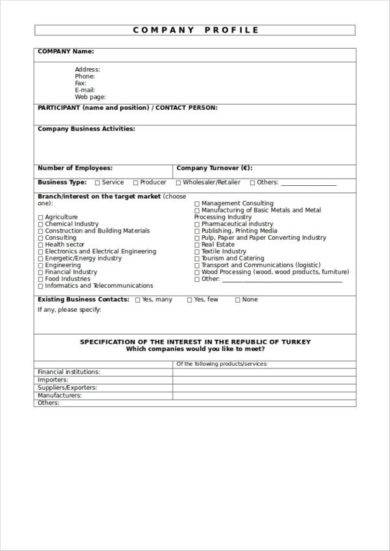
9. Company Introduction Template (Design 2)

Frequently Asked Questions – Company Profile Templates
1. What is a company profile template?
A company profile template is a pre-designed document used to introduce a business and provide information about its history, products or services, mission, achievements, management, and contact details.
2. What should a company profile include?
A company profile commonly includes the company overview, history, mission and vision, products or services, management team, achievements, capabilities, and contact information.
3. Can I edit a company profile template in Word?
Yes. A company profile Word template can be customized with your company’s name, logo, business information, services, photographs, and other relevant details.
4. What is the difference between a company profile and a business plan?
A company profile introduces and describes a business, while a business plan provides more detailed information about business strategy, operations, marketing, finances, and future plans.
5. Can a small business use a company profile template?
Yes. A small business company profile can be a concise document highlighting the company’s services, experience, strengths, achievements, and contact information.
6. How long should a company profile be?
There is no fixed length. A simple company profile may be a few pages, while a larger corporate profile can be more detailed. The ideal length depends on the purpose and audience.
7. Can a company profile be used to attract investors?
Yes. A company profile can introduce investors to the business, its experience, capabilities, products, management, and market position. However, it should not replace a detailed business plan or financial documents when those are required.
8. Can I save a company profile as a PDF?
Yes. After editing a company profile in Word or another compatible application, you can save or export it as a PDF. This preserves the formatting when sharing the document digitally.



You must be logged in to post a comment.