Track scheduled days, absences, late arrivals and shift coverage with 10 editable Excel attendance templates.
Use the monthly attendance summary for reporting and the shift coverage tracker when you need to know whether enough people are available today. Separate attendance records from payroll approval and limit access to completed employee files.
Choose a template
| Template | Preview | Download |
|---|---|---|
| Monthly Attendance Tracker Enter P, A, L or H by day and calculate attendance from present and absent days. | Preview | Download Monthly Attendance Tracker (Excel) |
| Shift Coverage Tracker Show whether enough employees reported for a shift. | Preview | Download Shift Coverage Tracker (Excel) |
| Late Arrival Log Calculate minutes late from scheduled and actual clock readings in minutes after midnight. | Preview | Download Late Arrival Log (Excel) |
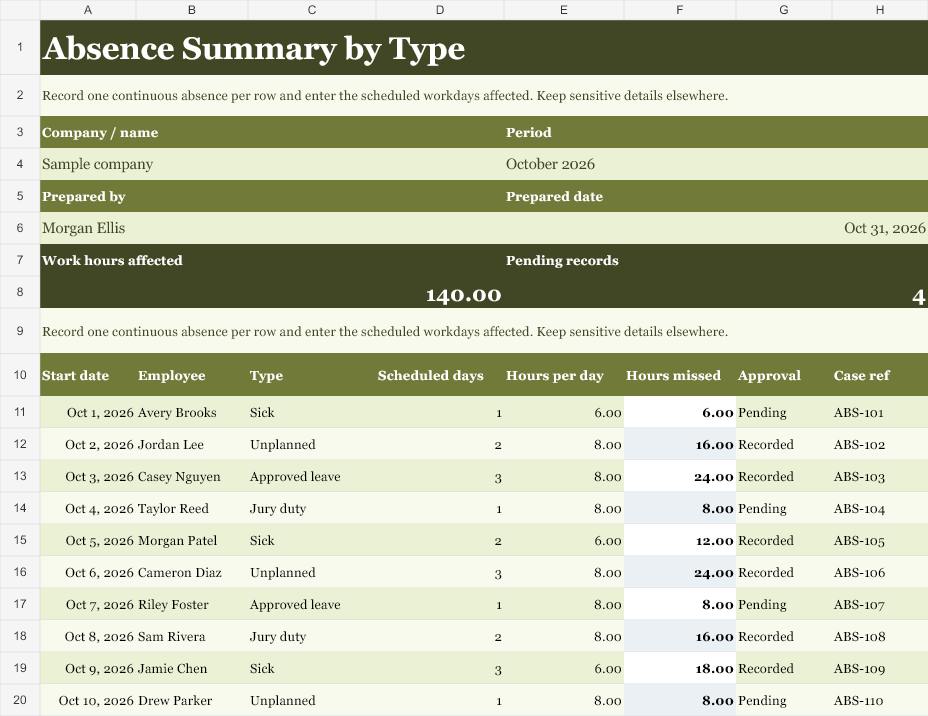
| Absence Summary by Type Total approved and unplanned absence days for each employee. | Preview | Download Absence Summary by Type (Excel) |
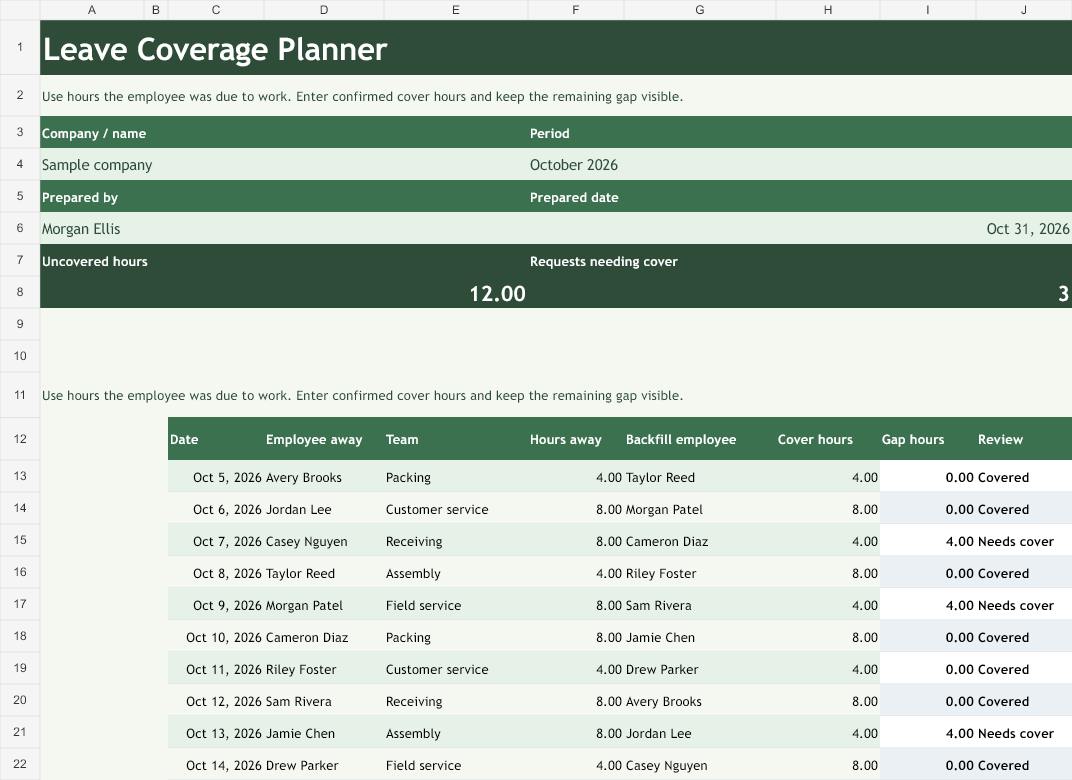
| Leave Coverage Planner Check staff remaining against a coverage target. | Preview | Download Leave Coverage Planner (Excel) |
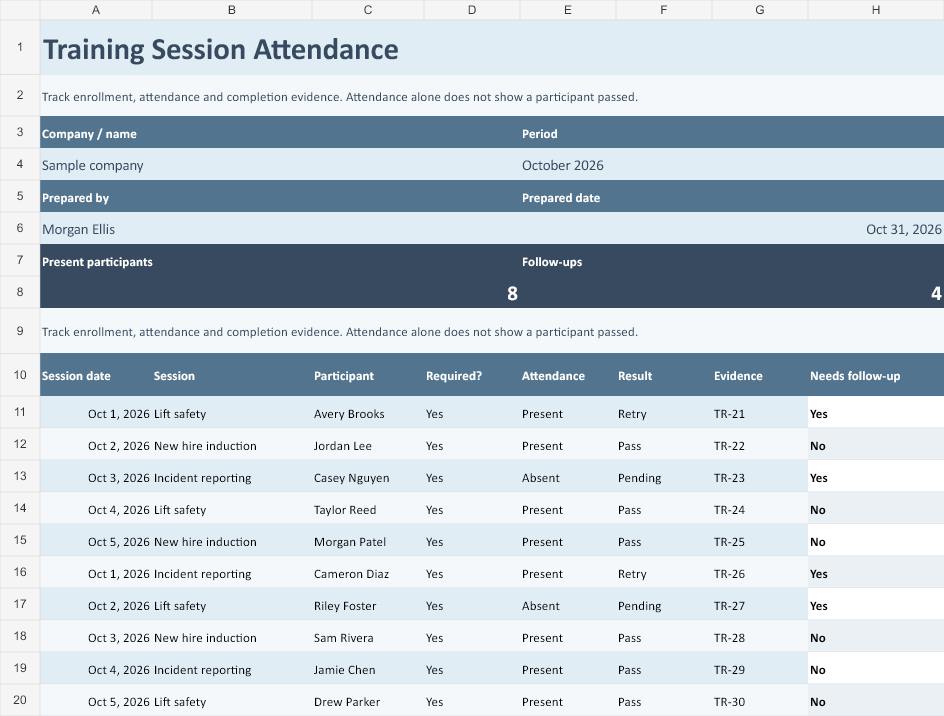
| Training Session Attendance Compare attendance with registrations for each session. | Preview | Download Training Session Attendance (Excel) |
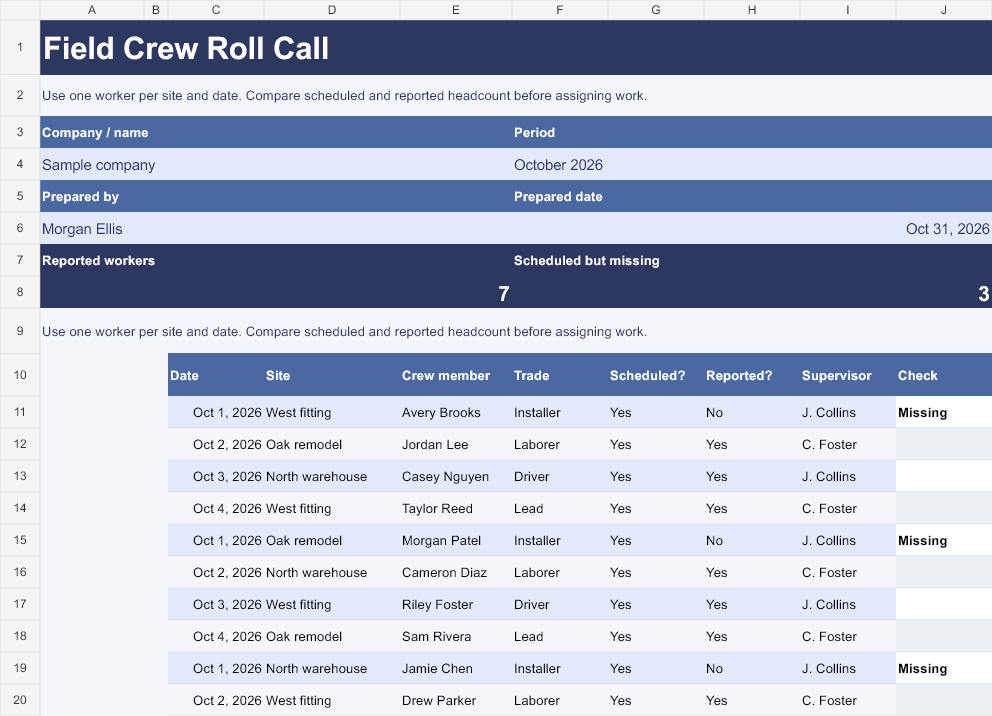
| Field Crew Roll Call Reconcile who checked in against the expected crew. | Preview | Download Field Crew Roll Call (Excel) |
| Hybrid Office Attendance Measure office attendance against the number of planned office days. | Preview | Download Hybrid Office Attendance (Excel) |
| Partial Day Absence Tracker Calculate scheduled hours missed during a partial absence. | Preview | Download Partial Day Absence Tracker (Excel) |
| Attendance Correction Log Track the change between originally recorded and corrected hours. | Preview | Download Attendance Correction Log (Excel) |
How to use the templates
Define the denominator
Decide whether approved leave stays in scheduled days for your report. The monthly workbook divides present days by scheduled days. Enter the scheduled count consistently and explain any policy-specific exclusion.
Separate schedule from attendance
A scheduled shift records the plan. Check-in records what occurred. Leave and coverage sheets help explain the difference without conflating an approved day off with an unplanned absence.
Log exceptions promptly
Record the original and corrected entries, who approved the change and which period it affects. Use the partial-day log when hours are more useful than a whole-day attendance code.
Review with the right audience
Share coverage gaps with schedulers and detailed employee records only with authorized staff. Before payroll closes, reconcile approved attendance changes against the time sheet.
Worked example
An employee attends 18 of 20 scheduled days. The monthly attendance rate is 90% under the workbook’s denominator. A shift requires seven people but five check in, leaving a coverage shortfall of two. That figure tells the scheduler to review coverage without needing to expose anyone’s leave reason.
Use the sheet during the month
Record check-ins promptly and resolve missing entries before you run a summary. A missing entry is a request for follow-up. Confirm the actual attendance with the person responsible before changing a record. If an employee is transferred to another team midmonth, record when the change takes effect.
Make coverage easy to interpret
Keep shift coverage focused on what the manager needs to assign. Record the number required and the number checked in. If the sheet shows a gap, record who will act and when they will reassess. Use employee-level detail only in the records intended for authorized reviewers.
Record leave and late arrivals separately
The person who approves leave may need details that a shift supervisor does not. Keep approved leave days and unplanned absence days separate, then record any corrections with a reference to the original entry. For lateness, a 9:00 start and 9:20 arrival gives 20 minutes. Use dates with times if a shift crosses midnight so the workbook can calculate the interval correctly.
Use a separate field roll call
A crew lead can reconcile twelve expected workers against eleven check-ins and report one unconfirmed entry. Confirm the missing entry before treating it as an absence. A reassigned employee might have checked in at another site. Use one shared roster per shift and note the location where each person was expected.
Agree on a reporting period and use the same definitions across teams. When employees work different schedules, raw attendance counts can be misleading. Compare presence with each person’s own schedule and document any exclusions. For a session attendance report, distinguish registration from attendance and record cancellations consistently.
Give supervisors a way to note a correction without deleting the original record. Record what changed, when it changed and who verified it. If a name is missing from a roster, check the source schedule before adding it. Review the workbook’s sample rows and delete or replace them before reporting a real period.
Related downloads
See Time sheet templates and Payroll templates for the records you may need before or after this step.
Template previews and editable downloads
Monthly Attendance Tracker
Enter P, A, L or H by day and calculate attendance from present and absent days.
Download Monthly Attendance Tracker (Excel)
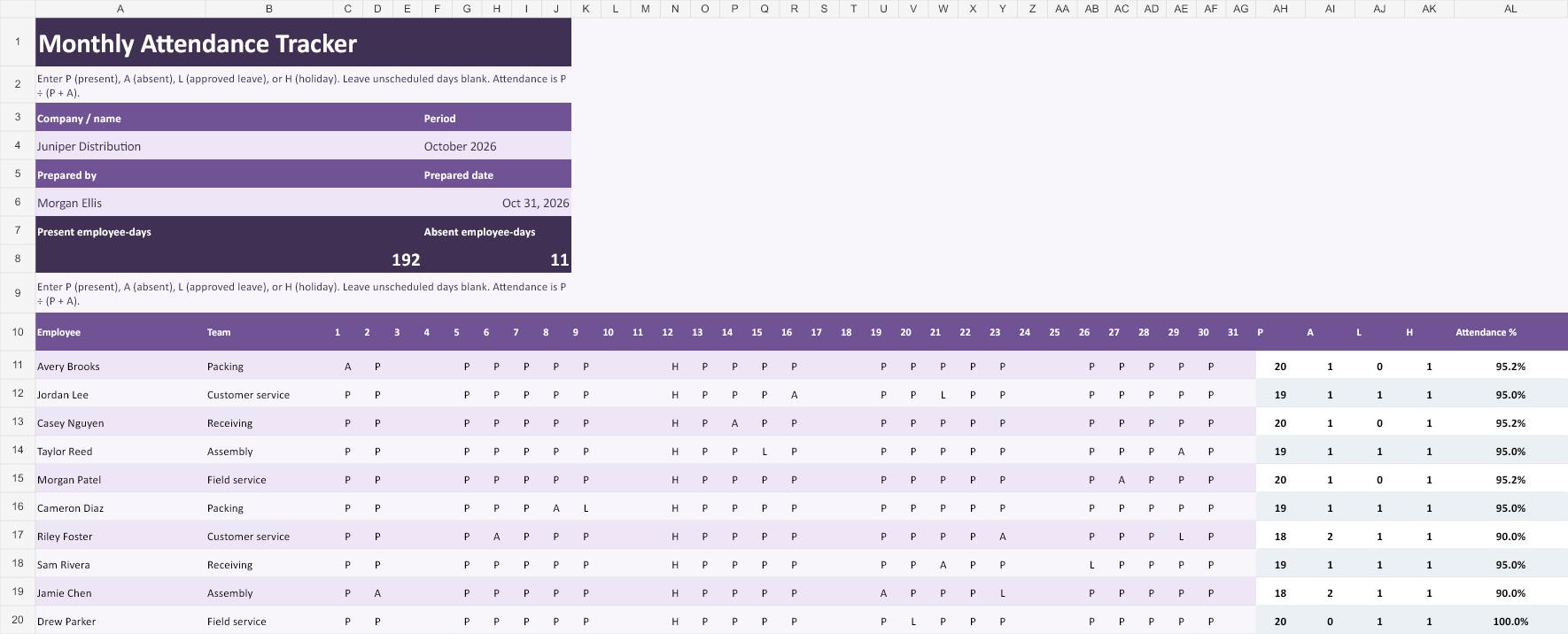
Use the month grid as the reporting record. Replace the sample employee names and enter one code for each applicable day. P is present, A is absent, L is approved leave, and H is a holiday. Leave days outside the month and unscheduled days empty, including day 31 in a 30-day month. The row totals count each code and divide present days by present plus absent days.
Shift Coverage Tracker
Show whether enough employees reported for a shift.
Download Shift Coverage Tracker (Excel)
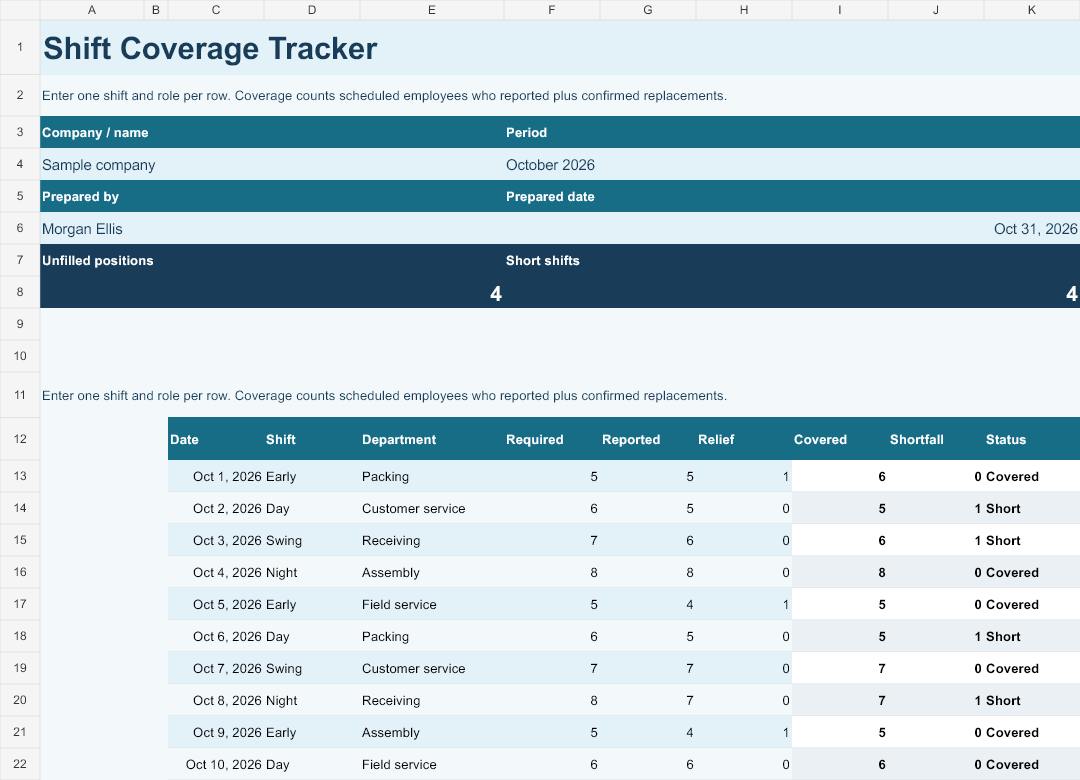
The shift sheet answers a staffing question before it becomes a service problem. Enter the required number for the specific shift and team, then record who reported and how many confirmed relief workers can cover it. Avoid adding the same person to both reported and relief. An eight-person shift with six arrivals and one confirmed replacement has one position to fill.
Late Arrival Log
Calculate minutes late from scheduled and actual clock readings in minutes after midnight.
Download Late Arrival Log (Excel)
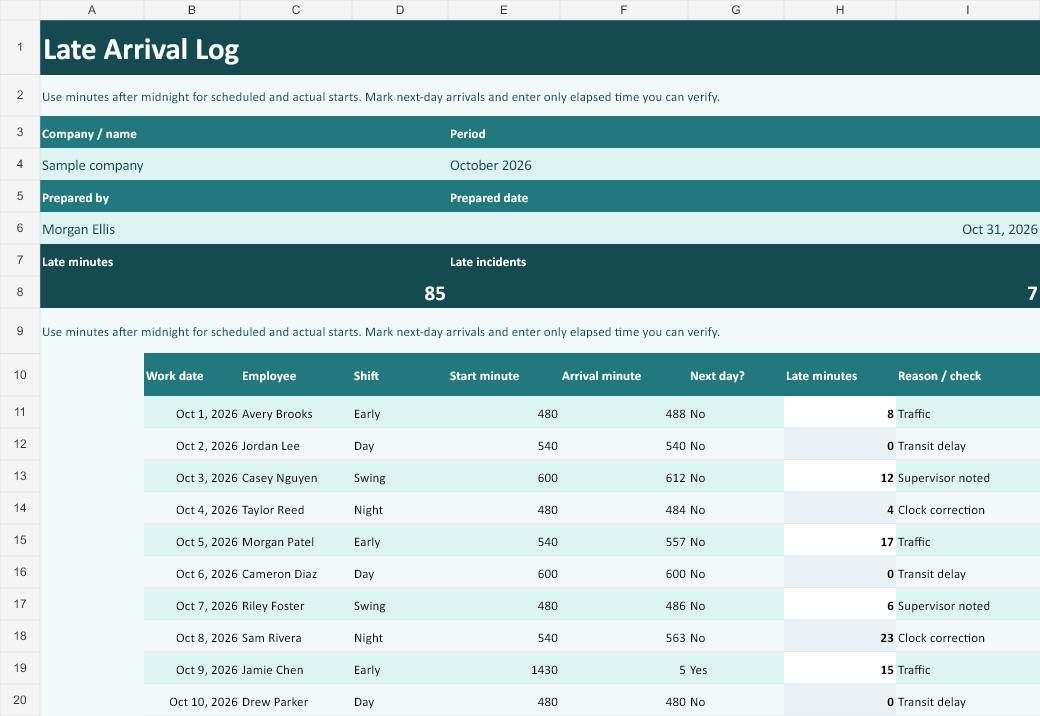
Use the late arrival log when the policy requires recording minutes. Put the scheduled date on the row and enter both clock readings as minutes after midnight. A start scheduled at 11:50 p.m. is minute 1,430. An arrival at 12:05 a.m. the next day is minute 5 with Next day marked Yes. The elapsed difference is 15 minutes.
Absence Summary by Type
Total approved and unplanned absence days for each employee.
Download Absence Summary by Type (Excel)
Use the absence summary when a supervisor needs to compare the hours affected by several events. Enter scheduled workdays for each distinct event and hours per scheduled day. For a person scheduled for two six-hour shifts, enter two and six. Keep any confidential supporting information in the appropriate employee system and reference only the case identifier in a shared worksheet.
Leave Coverage Planner
Check staff remaining against a coverage target.
Download Leave Coverage Planner (Excel)
Give the leave coverage planner to the person arranging relief. Start with the hours the employee was expected to work, then enter only the hours covered by a confirmed replacement. An approved eight-hour absence with four hours of coverage leaves four hours unfilled, even if the supervisor has requested help for the entire day.
Training Session Attendance
Compare attendance with registrations for each session.
Download Training Session Attendance (Excel)
Training records need three separate facts: whether attendance was required, whether the employee attended, and whether the session outcome was complete. Enter a reference to the evidence or assessment when you have it. A participant who attended but needs a retest should stay on the follow-up list until the result changes.
Field Crew Roll Call
Reconcile who checked in against the expected crew.
Download Field Crew Roll Call (Excel)
Use the field crew sheet before the crew starts work. Enter the assigned site, worker, trade and whether the person was scheduled to report. A supervisor can then investigate who is still missing. Save the record under the correct date so an arrival at a second site does not accidentally replace the first roll call.
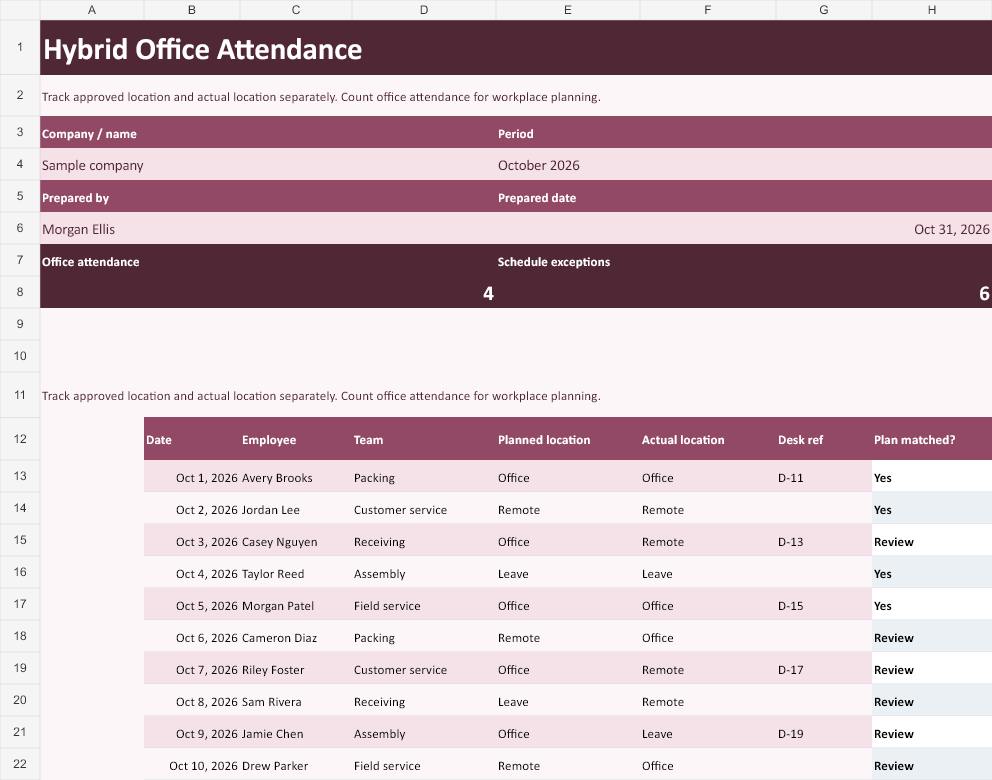
Hybrid Office Attendance
Measure office attendance against the number of planned office days.
Download Hybrid Office Attendance (Excel)
Use the hybrid sheet to compare work location with the agreed schedule. Enter where a person was expected and where they worked. A remote day can be a valid day of attendance, so use the comparison as a prompt to check the arrangement. Record the desk reference when it helps a coordinator plan space.
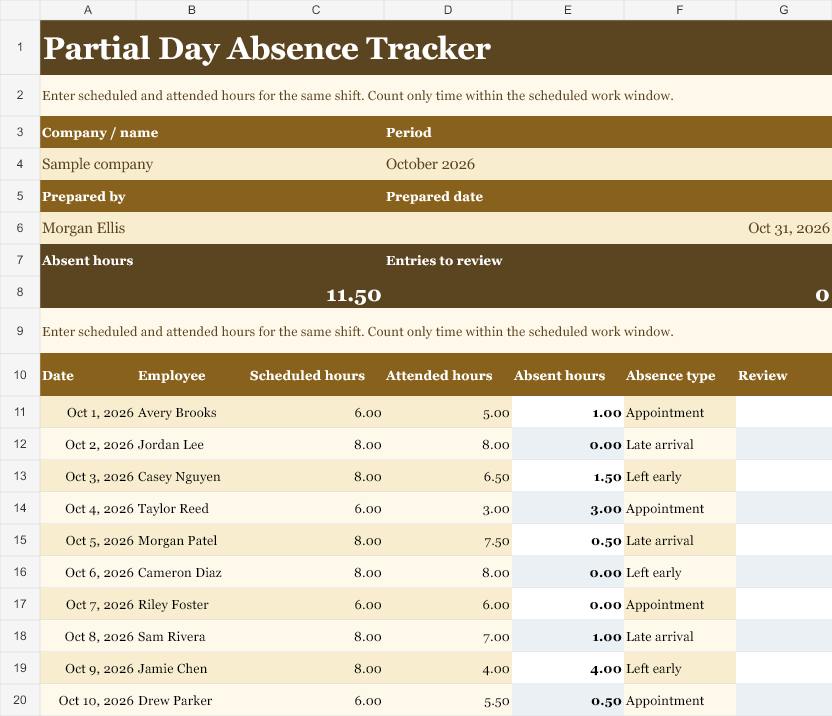
Partial Day Absence Tracker
Calculate scheduled hours missed during a partial absence.
Download Partial Day Absence Tracker (Excel)
Enter the scheduled and attended hours for the same work window. If someone scheduled for eight hours worked six and a half hours, the worksheet records one and a half hours missed. A value above the scheduled hours gets a review flag. Investigate the entry and handle any additional hours in the applicable time or payroll record.
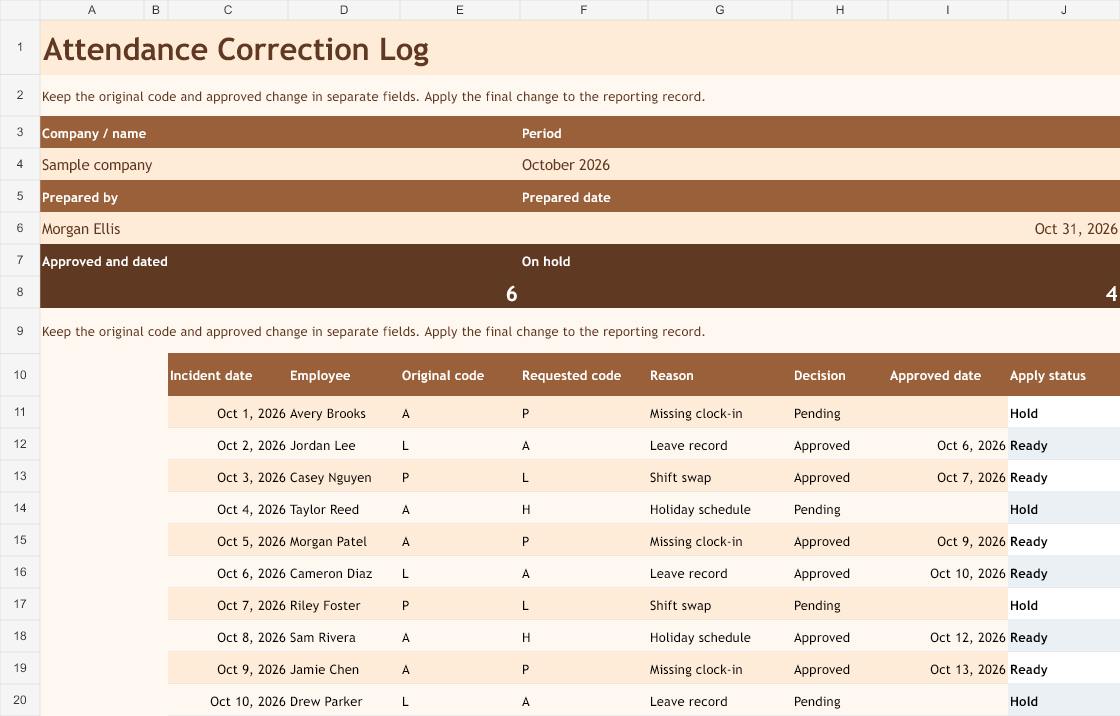
Attendance Correction Log
Track the change between originally recorded and corrected hours.
Download Attendance Correction Log (Excel)
The corrections log captures what the record originally said, what change was requested and whether it was approved. For a missing clock-in, keep the documented reason and approval date. Apply the approved code to the monthly grid afterward and keep the correction log so a later reviewer can follow what happened.
Close out the month without losing the audit trail
Review employees who joined or left mid-month, along with people who moved between teams. Enter codes only for the employee’s applicable schedule. Check outstanding corrections against attendance records before finishing the report. If two departments use different attendance definitions, spell out which denominator each report uses and keep like-for-like results together. The sample monthly formula excludes approved leave and holidays and returns an empty percentage when neither present nor absent days have been entered.
Reconcile the completed summary with the time sheet record when the same dates also affect hours worked. Share only the fields a recipient needs. Retain the completed month separately from the blank template so new entries cannot overwrite historical data.
Frequently asked questions
Should attendance replace a time sheet?
Attendance records presence or absence. A time sheet records work hours. Reconcile the two when your process calls for it.
Can a late-arrival entry cross midnight?
Use date and time values together for overnight shifts. The example worksheet uses same-day time values.
How do I start a new month?
Save a new copy, replace the period in the title block and clear the sample day codes. Keep the calculated columns and enter codes only for the dates that apply to your schedule.
How does the percentage treat leave and holidays?
It uses present days divided by present plus absent days. L, H and blank cells are excluded. Check your organization’s reporting definition before comparing with another system.