

Use these time sheet templates to record weekly, biweekly and project work hours. Compare 5 downloads below, then choose the file that fits your task.
Choose a Download
| Resource | Format | Download |
|---|---|---|
| Biweekly Time Sheet Template | Excel | Download Biweekly Time Sheet Template |
| Project Time Sheet Template | Excel | Download Project Time Sheet Template |
| Employee Time Card Template | Word | Download Employee Time Card Template |
| Weekly Time Sheet with Breaks | Excel | Download Weekly Time Sheet with Breaks |
| Monthly Time Sheet Template | Excel | Download Monthly Time Sheet Template |
For the next step, compare payroll templates and job description templates.
What Is a Time Sheet?
A time sheet (or timesheet) is a record of the hours an employee or contractor works over a period, usually a day, week or pay period. It shows start and finish times, breaks and total hours, and may also record overtime, leave or time spent on specific projects. A time sheet template gives you a ready-made form for tracking hours accurately for payroll, invoicing or project costing.
More about time sheet template
Time sheet is the best and recommended method of time tracking within the business organization or company. It may indicate details like name of the business organization at its top, department name, names of employees, employee codes, in time, out time and lunch break duration etc. All recently motioned information and details make sense for the employer or company to calculate wages or salaries for workers at the end of week or month. Such sheets are also prepared by supervisors and team leaders to record time spent on various assigned tasks and jobs. Through this way overall performance of employees can easily be checked by the supervisor or employer.
Time sheet making is not a big deal anymore due to availability of advanced computer programs and software. A free time sheet template is presented here on this page which has blank fields and spaces to add up basic details about employees and time spent at workplace. A user will only need to add start time, stop time and any break or lunch for each day and the template will automatically calculate working hours for each employee added in the list.
Free Time Sheet Template in Excel and Word
The collection provides 5 files in Excel and Word. Edit the Word documents in a compatible word processor. Use Excel for the spreadsheet files. For a printable PDF, export a completed document from its application rather than looking for a separate PDF download.
What to Include in a Time Sheet
- Employee or contractor name and ID.
- Company or client name and department.
- Period covered: week starting date or pay period.
- Date and day for each entry.
- Start time, finish time and break duration.
- Total hours for each day and for the period.
- Overtime hours, if applicable.
- Leave taken, such as vacation, sick leave or holidays.
- Project, task or job codes for billable work.
- Employee and supervisor signatures and dates.
Types of Time Sheets
- Daily time sheet: hours for a single day, often used on job sites.
- Weekly time sheet: the most common format for hourly employees.
- Biweekly or monthly time sheet: matches longer pay periods.
- Project time sheet: hours split by project or client for billing.
- Contractor or locum time sheet: hours worked at a client site, signed by the client.
- Volunteer time sheet: tracks volunteer hours for records or programs.
Paper vs. Digital Time Sheets
Paper time sheets are simple and work anywhere, which is why they remain common on construction sites, in healthcare and for temporary staff who need a client signature. Digital time sheets in Excel or online tools reduce calculation errors, are easier to store and can be emailed for approval. Whichever you choose, use one consistent format across the team so payroll or billing can be processed quickly.
Using Time Sheets for Client Billing
Freelancers and agencies often attach a time sheet to each invoice as proof of the hours charged. Record the client, project and a short description of the work for each entry, and round times consistently, for example to the nearest quarter hour, so totals are clear and easy for the client to check.
How to Fill Out a Time Sheet
Enter your name, the period covered and any employee or project codes. For each day, record your start time, finish time and unpaid break time, then calculate the hours worked. Many people find it easiest to convert times to decimal hours, for example 7 hours 30 minutes becomes 7.5 hours.
Add up the daily totals for the week and record any overtime or leave separately. Check the entries, sign the time sheet and submit it to your supervisor or client for approval by the payroll deadline.
Benefits of Using Time Sheets
Time sheets help make sure employees are paid correctly for the hours they work, and they give contractors and freelancers an accurate basis for invoices. They also show how much time goes into each project, which helps with quoting, budgeting and planning staff schedules.
Tips for Accurate Time Tracking
- Fill in your time sheet daily rather than from memory at the end of the week.
- Record breaks clearly, especially unpaid ones.
- Use project codes consistently for billable work.
- Double-check totals before signing.
- Keep copies of submitted and approved time sheets.
Note: this is general information, not legal or payroll advice. Rules on working hours, breaks, overtime and record keeping vary by country and employer, so check the requirements that apply to you.
Free Time Sheet Templates Are Added Here
Below are free time sheet templates in Excel and Word, including biweekly, project, weekly with breaks and monthly time sheets and an employee time card. Download a time sheet template, add your details and start recording your hours.
Biweekly Time Sheet Template (Excel)

A two-week Excel time sheet with time in, lunch and time out for each day, automatic daily hours, overtime after 8 hours, total pay and signature lines.

Project Time Sheet Template (Excel)

A weekly project time sheet for freelancers and agencies that tracks hours by project and task, separates billable time and calculates utilization and billable amount.
Employee Time Card Template (Word)

A printable weekly employee time card, two per page, with time in and out, lunch breaks, daily totals, regular and overtime hours and approval signatures.
Weekly Time Sheet with Breaks (Excel)

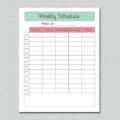
A weekly Excel time sheet with time in, break start and end and time out, automatic daily hours, overtime after eight hours and weekly pay at time and a half.
Monthly Time Sheet Template (Excel)

A monthly Excel time sheet with a row for every day, shaded weekends, US federal holidays filled in, sick and PTO hours and automatic hours and gross pay.
Frequently Asked Questions
What is a time sheet used for?
A time sheet records the hours someone works so they can be paid correctly, billed to a client or allocated to projects.
How do I calculate hours on a time sheet?
Subtract the start time from the finish time, then subtract any unpaid break time. Convert minutes to decimals if needed, such as 30 minutes to 0.5 hours.
What is the difference between a weekly and biweekly time sheet?
A weekly time sheet covers one week, while a biweekly time sheet covers two weeks to match a two-week pay period.
Can I use an Excel time sheet template?
Yes. An Excel time sheet template can calculate daily and weekly totals automatically from the times you enter.
Who signs a time sheet?
Usually the employee or contractor signs it, and a supervisor or client signs to approve the hours.


Pingback: 5 Free Payroll Templates (Excel & Word)
Pingback: Free Salary Certificate Templates (Word) – Download Now