

Choose one of these ten free monthly budget templates to plan household expenses, organize bills around your paydays, or see where your money went. Each template is an editable Excel workbook with a preview, example entries, and formulas. You can download the .xlsx file and import it into Google Sheets if you prefer to work in a browser.
The best personal budget spreadsheet depends on the decision you need to make. Use a plan-versus-actual worksheet if you want to compare last month’s numbers. Use a paycheck planner if you know what the bills cost and need to decide which deposit will cover them. For couples or roommates, use the shared expense worksheet to calculate a settlement without combining every personal transaction.
Choose a monthly budget template
- Monthly Budget vs. Actual · See where real spending differed from the plan
- Biweekly Paycheck Budget · Give each bill a paycheck
- Irregular Income Budget · Plan essentials against a conservative income floor
- Shared Household Budget · Split bills and calculate a settlement
- Zero-Based Budget · Assign every dollar before spending
- Sinking Fund Planner · Save monthly for a known future bill
- Monthly Bill Calendar and Cash Flow · Catch low balances between paydays
- Weekly Spending Envelopes · Track flexible spending each week
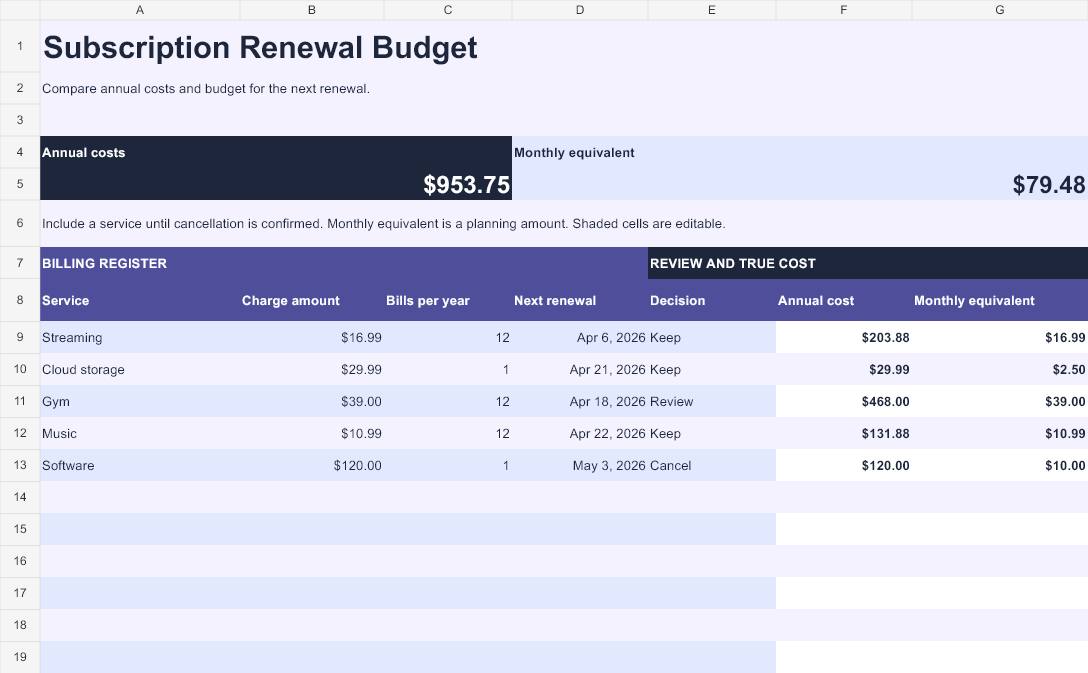
- Subscription Renewal Budget · See the full cost of recurring subscriptions
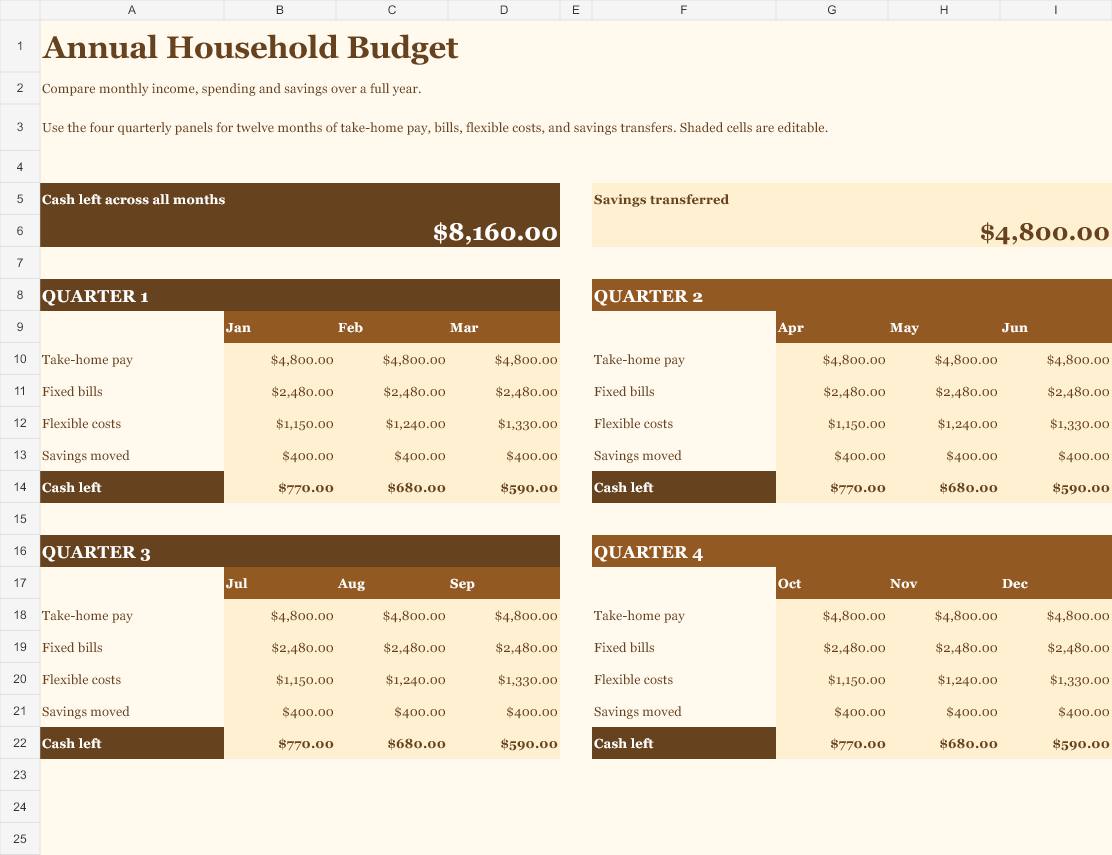
- Annual Household Budget · Compare twelve months in one sheet
Monthly budget template previews and downloads
Open any preview to see the example at full size. Download the workbook you want, then replace the sample entries in the tinted cells.
Monthly Budget vs. Actual
Download Monthly Budget vs. Actual (Excel)
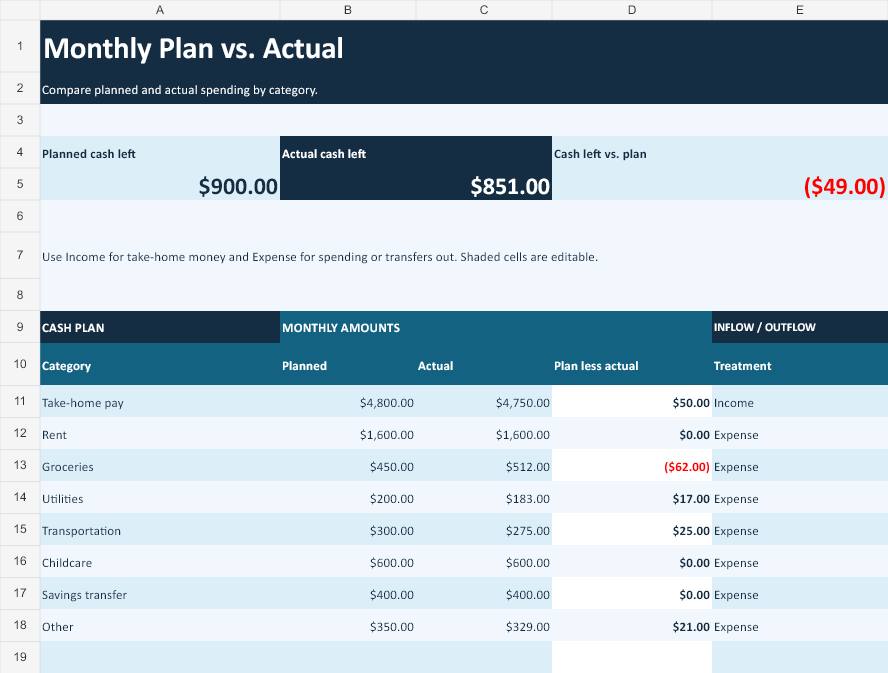
Start here if you want a monthly expense tracker with separate planned and actual amounts. Enter take-home pay, housing, groceries and other categories in the same table. The variance column shows planned minus actual. On a grocery line, a negative figure means you spent more than planned. On an income line, a positive figure means you received less than planned. Use the two cash-left totals to check the overall effect before changing next month’s limits.
Biweekly Paycheck Budget
Download Biweekly Paycheck Budget (Excel)
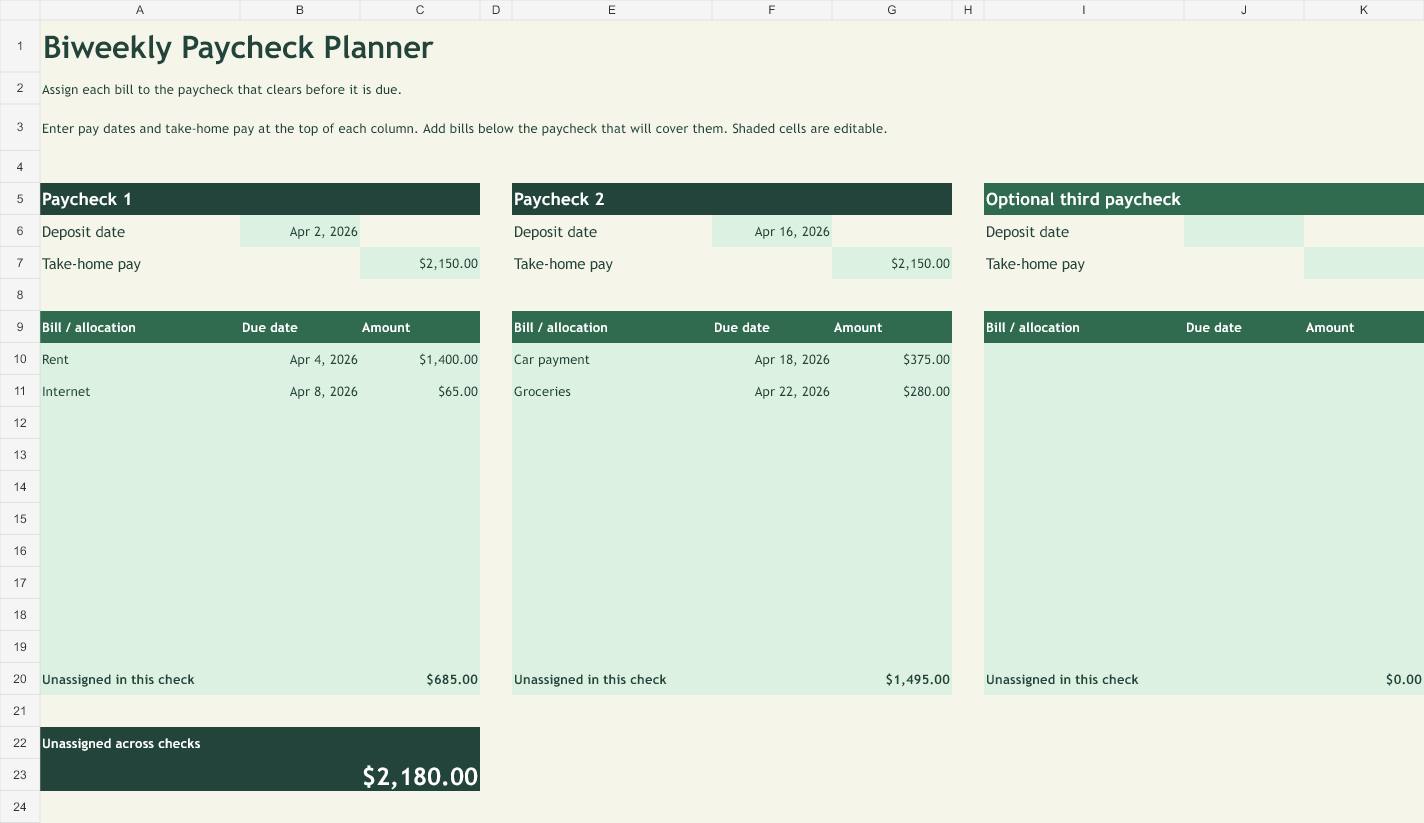
Use this paycheck budget template when you get paid every two weeks and need to match bills to deposits. Enter each deposit at the top of its own panel, then list the bills it will cover underneath. The balance beside each paycheck shows what remains after those assignments. In a three-paycheck month, add the optional third check only after confirming the pay date. You can earmark that check for an upcoming expense instead of depending on it for regular monthly bills.
Irregular Income Budget
Download Irregular Income Budget (Excel)
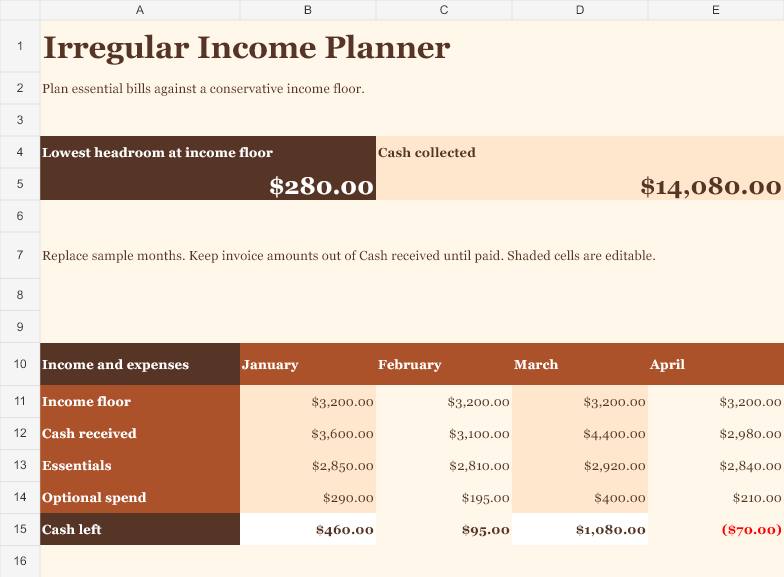
Use this workbook for commission income, gig work, seasonal hours or freelance payments. Each month has its own column. Enter a conservative cash estimate, then record essentials, money actually received, and optional spending. The two views answer different questions. The income floor helps you test whether essentials fit a lean month. Actual cash left tells you how the month ended. If an invoice is still outstanding, leave it out of the cash received column until the payment clears.
Shared Household Budget
Download Shared Household Budget (Excel)
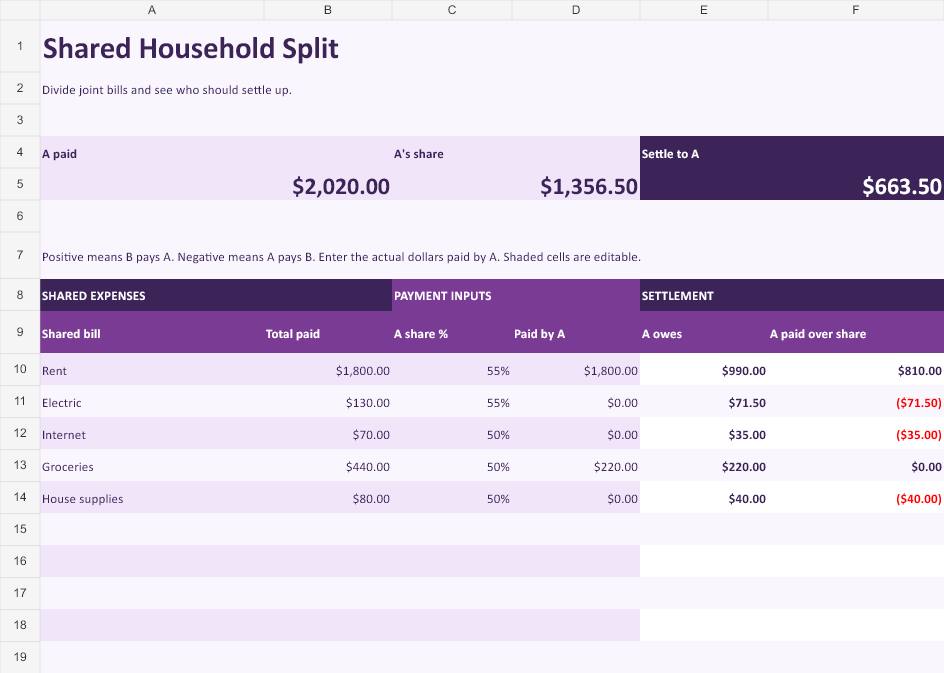
Use the shared budget spreadsheet when one person pays rent, another pays utilities, and you want one settlement at the end of the month. Set a split for each bill and enter what Person A actually paid. A 50/50 split can sit beside a 55/45 split because each row has its own percentage. A positive settlement means Person B pays Person A. A negative settlement means Person A pays Person B. Leave personal expenses out of the shared list.
Zero-Based Budget
Download Zero-Based Budget (Excel)
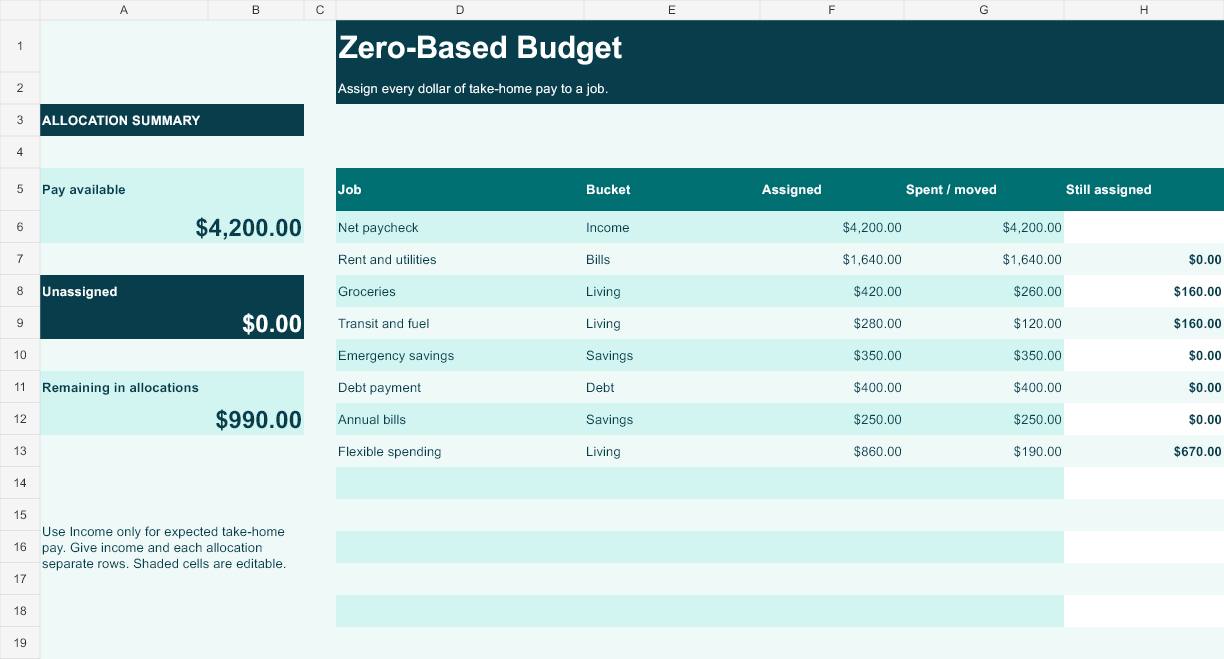
Use this zero-based budget template to give each dollar of expected take-home pay a specific job. Enter the paycheck as income, then plan allocations for bills, groceries, savings, debt payments and other goals. The summary shows how much is still available to assign. A zero means your plan accounts for the income you entered. It can include money assigned to priorities such as an emergency fund or a cash cushion. Use the spent column later to see what remains in each category.
Sinking Fund Planner
Download Sinking Fund Planner (Excel)
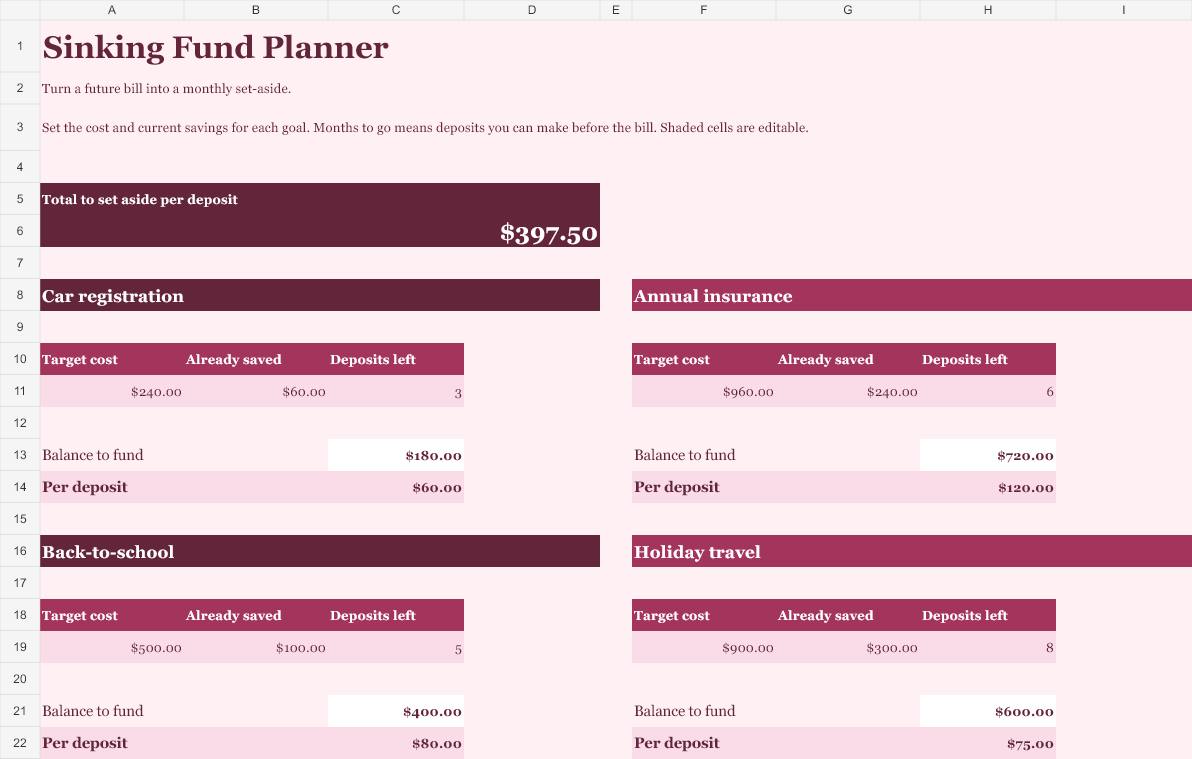
Use the sinking fund tracker for bills you can anticipate, such as auto insurance, vehicle registration, school expenses or a planned trip. Enter the target amount, existing savings and how many deposits you can make before payment. Each goal has its own card showing what is left to fund and the amount to set aside per deposit, rounded up to the cent. A $960 premium with $240 saved and six deposits remaining requires $120 per deposit. When the date changes, update the remaining deposits first.
Monthly Bill Calendar and Cash Flow
Download Monthly Bill Calendar and Cash Flow (Excel)
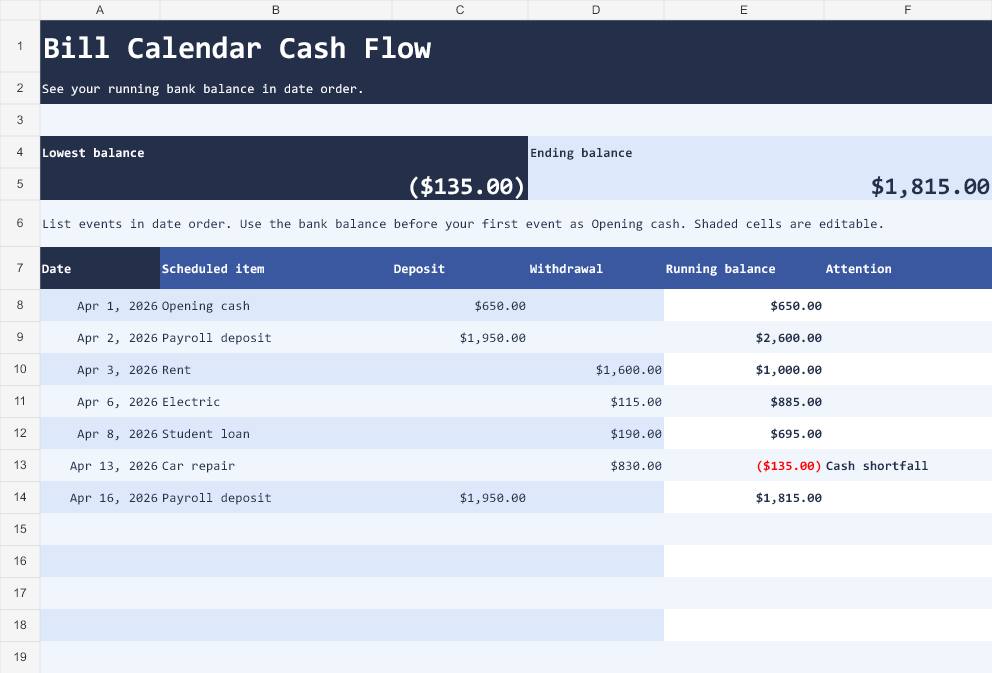
Use this monthly bill calendar if the month looks affordable overall but your account runs low before payday. Start with cash already in the account, then list deposits and withdrawals in date order. The sheet shows the running balance and flags negative entries. Include autopay withdrawals and transfers that are expected to clear. If a check and a bill share a date, use the order you expect them to post. Make a copy before testing a change to the schedule.
Weekly Spending Envelopes
Download Weekly Spending Envelopes (Excel)
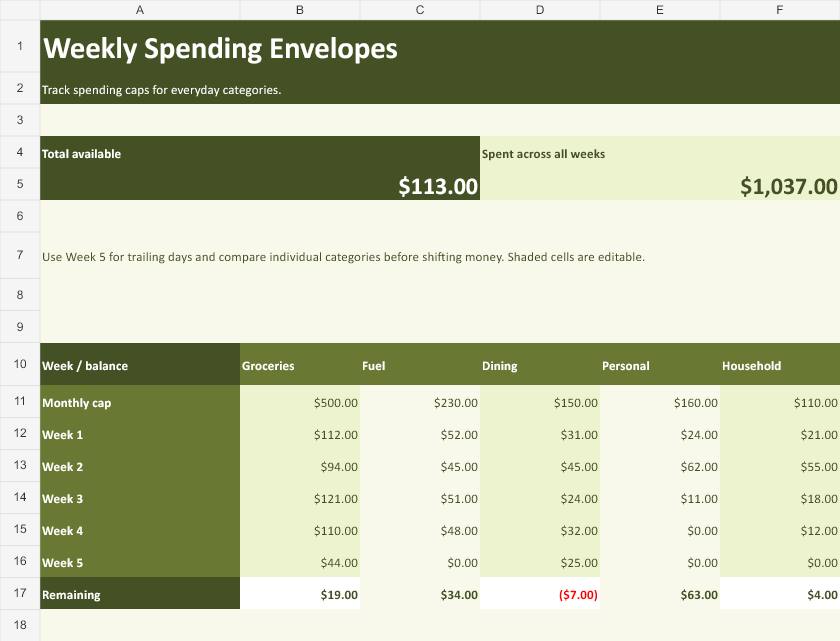
Use the weekly spending tracker for categories that can drift over a month, such as groceries, gas, dining and personal purchases. Set a monthly limit for each envelope and add the weekly totals. Use the Week 5 row for trailing days. Review individual categories even when the total is positive. One category may still be over its limit. Decide where any offset will come from and record the new limits so the same dollars stay assigned only once.
Subscription Renewal Budget
Download Subscription Renewal Budget (Excel)
Use the subscription tracker to put annual, monthly and other recurring charges on comparable terms. Enter the charge amount, number of charges per year and next renewal date. The workbook shows the yearly cost and its monthly equivalent. Keep the actual renewal amount in your bill calendar so you still see the larger withdrawal when it is due. Give every service a decision, such as Keep, Review or Cancel. Keep it in the total until the provider confirms cancellation.
Annual Household Budget
Download Annual Household Budget (Excel)
Use the annual household budget sheet when monthly costs vary and you need a full-year view. Enter take-home pay, fixed bills, flexible costs, and savings transfers in the month’s column. The four quarterly panels keep related months together. You can compare January with a more expensive month and see cash left across the year. Use a consistent basis for all twelve months. Keep one version for estimates and a separate copy for actuals if you want a clean comparison. The month columns work for any year.
How to set up a monthly budget spreadsheet
Save your own copy and replace the example entries. Start with the amount that reaches your bank account after payroll deductions. Use bank statements and recent bills to find your starting numbers. For a U.S. household, useful categories may include rent or mortgage, utilities, groceries, car insurance, fuel, childcare, prescriptions, student loan payments and savings transfers. Keep categories broad enough that you can update them consistently.
- Enter income with its timing. For predictable pay, list deposit dates and amounts. For changing income, base recurring bills on a conservative amount and enter higher earnings only when they arrive.
- Separate fixed bills from flexible spending. Rent and the internet bill usually have clear due dates. Groceries, dining and fuel are easier to manage with a weekly checkpoint. Use your recent transactions to set a realistic first estimate.
- Make room for nonmonthly bills. Divide a known future cost by the deposits left before the due date, after subtracting anything already saved. Review the number whenever the due date or expected cost changes.
- Check the running balance. A positive monthly total can still hide a gap between deposits. Use the bill calendar if a payment is due earlier than the paycheck that would cover it.
- Review the difference at month end. Compare expected and actual spending and make one or two specific changes for next month. If groceries repeatedly run $60 above plan, update the category or decide what purchase pattern to change.
If you need a starting list of income and expense categories, compare your worksheet with the Consumer Financial Protection Bureau’s monthly budget worksheet. Use the categories that match the way your household pays bills and receives income.
Worked example for a two-paycheck household
Say two paychecks bring in $2,150 each. The first arrives before $1,400 rent and $65 internet are due, so it has $685 left after those assignments. The second covers a $375 car payment and $280 set aside for groceries, leaving $1,495 before other commitments. The total still needs to cover any bills or savings goals you have not entered. If rent is due before the first deposit, test the date in the bill calendar and work out how much cash needs to stay in the account from the previous month.
Now suppose the household has a $960 insurance bill due after six more pay periods in which it can save. It already has $240 set aside, leaving $720 to cover. Six available deposits make the target $120 per deposit. If the plan is to save only once each month, count the actual monthly deposits remaining and update the sinking fund sheet. The number of contributions available is what determines the target.
Keep the budget accurate from month to month
Give each transaction one place in your records. If you log groceries when you charge them to a credit card, a later payment of the card balance can duplicate that grocery expense in a spending report. The payment still belongs in your bank cash-flow calendar on the day the money leaves. Review spending by purchase date and cash flow by payment date when the distinction affects your decisions.
Update upcoming amounts from real statements and bills. At the end of the month, save a dated copy of your completed tracker, then duplicate it for the next month. Carry forward the bank opening balance or the amount already saved toward each sinking fund where appropriate. Clear last month’s transactions before you enter the new ones. Keep dates and currency cells as numeric entries so the formulas calculate correctly.
For a broader household planning system, use a monthly calendar template for payment reminders. Pair your groceries allowance with a grocery list spreadsheet if you want to estimate the shopping trip before you go.
Frequently Asked Questions
Which monthly budget template should I start with?
Start with Monthly Budget vs. Actual if you want a simple household budget worksheet. Choose the biweekly paycheck budget if the main challenge is assigning bills to deposit dates.
How do I open these templates in Google Sheets?
Download the .xlsx, open Google Sheets, then use File → Import → Upload and select the file. Use your own copy, then check that dates and currency display as expected for your locale.
How do I budget when I get paid every two weeks?
Write down the actual dates of the two or three deposits in the month. Assign each bill to a deposit that clears before the due date, and reserve money for bills due before the next deposit. Plan the optional third paycheck after verifying when it arrives.
What is the difference between a sinking fund and a monthly budget?
A sinking fund tracks progress toward a specific future expense. The monthly budget shows how much money is available for current bills and goals. Put the planned sinking fund contribution in your monthly budget as money assigned to that goal.
Can I use the worksheets with weekly pay or two incomes?
Yes. The monthly plan accepts separate rows for each income source. If the dates of several deposits matter, list them individually in the bill calendar so you can see the effect of each payment or withdrawal.
How do I use a budget spreadsheet without sharing bank details?
Enter the amounts manually and save a private copy. The files use worksheet formulas and need no linked bank account. Use broad labels such as Checking or Paycheck A when the account name is unnecessary.

