

A tri-fold brochure is a practical marketing and information document divided into three panels on each side of a sheet. Its compact layout provides several sections for presenting information about a business, product, service, event, organization, project, or promotion. Related templates: free missing poster templates, free missing cat poster templates, free coupon templates and free binder cover templates.
A tri-fold template gives you a ready-made structure for creating a brochure without designing the layout from scratch. You can add your own text, images, contact information, headings, offers, and branding, then print or share the finished brochure. These free tri-fold templates can be useful for businesses, schools, nonprofits, events, restaurants, real estate, tourism, and many other purposes.
Tri-Fold Brochure Templates
Tri-fold brochures are popular because they provide several content areas while remaining compact and easy to distribute. The panels can be used for an introduction, product or service information, benefits, pricing, contact details, directions, or a call to action.
The most effective layout gives each panel a clear purpose. Avoid filling every available space with text. Short paragraphs, bullet points, images, headings, and sufficient white space can make the brochure easier to read.
Tri-Fold Template in Word
A tri-fold template in Word is useful when you want to create an editable brochure without specialized design software. You can customize the text, images, colors, fonts, headings, and business information directly in Microsoft Word.
Before printing, check the page orientation and panel arrangement carefully. A tri-fold brochure has a specific folding order, so print a test copy before producing a larger quantity.
Tri-Fold Brochure Template in PDF
A tri-fold brochure template in PDF can be useful when you want to preserve the layout while sharing or printing the document. PDF files generally maintain the intended formatting across different computers and printers.
If you are preparing artwork for professional printing, check the printer’s requirements for page size, margins, bleed, fold position, and file format. Important text and images should be kept away from areas that may be affected by trimming or folding.
Business Tri-Fold Brochure
A business tri-fold brochure can introduce a company and explain its products or services. You can use the panels for a company overview, services, benefits, customer information, contact details, and a call to action.
Include your business name, logo, website, phone number, email address, and other relevant contact information. Keep the main selling message easy to find rather than burying it in long paragraphs.
Product Tri-Fold Brochure
A product brochure can provide customers with information about features, specifications, benefits, pricing, and purchasing options. Images can help readers understand the product quickly.
Use concise descriptions and highlight the features that matter most to your target audience. If the product has technical specifications, organize them in a table or clearly labeled section.
Event Tri-Fold Brochure
A tri-fold brochure can be used to promote conferences, workshops, festivals, school events, fundraisers, exhibitions, and community activities. Include the event name, date, location, schedule, speakers, activities, registration information, and contact details.
A clear schedule is particularly important for event brochures. Use headings and spacing to make dates and times easy to scan.
Marketing Tri-Fold Brochure
A marketing tri-fold brochure provides a compact way to promote a product, service, business, or special offer. It can combine persuasive copy with images, testimonials, benefits, pricing, and contact information.
Focus the brochure on the audience’s needs. Explain what you offer, why it matters, and what the reader should do next. A strong call to action can encourage readers to visit a website, call a business, request a quote, or make a purchase.
Real Estate Tri-Fold Brochure
Real estate professionals can use tri-fold brochures to promote properties, neighborhoods, services, or listings. A property brochure can include photographs, property highlights, features, location information, agent details, and contact information.
Use high-quality property images and concise descriptions. Make sure prices, addresses, contact information, and other important details are accurate before printing.
Restaurant Tri-Fold Brochure
Restaurants can use tri-fold brochures for menus, catering services, special offers, event information, or promotional campaigns. The panels can be organized into menu categories, featured dishes, business information, and ordering details.
Keep food names and prices easy to read. If the brochure contains a menu, avoid overly decorative fonts that may make item descriptions difficult to scan.
How to Make a Tri-Fold Brochure
Start by deciding what information the brochure needs to communicate and who will read it. Divide the content into logical sections and assign each section to an appropriate panel.
Add headings, images, branding, contact information, and a clear call to action. Review the front and back panels together and check how the brochure will read after folding.
Always print a test copy before finalizing the design. Fold the test sheet to confirm that panels appear in the correct order and that text or images are not too close to the fold or page edge.
Tri-Fold Brochure Printing Tips
A tri-fold brochure is commonly printed on a landscape-oriented sheet and folded into three panels, but the exact panel dimensions can vary depending on the folding method and printer.
Keep important content inside safe margins and follow the printer’s requirements for bleed and trim. For professional printing, ask the print provider for its preferred template or specifications before preparing the final artwork.
Choose paper appropriate for the purpose of the brochure. A higher-quality paper stock can create a more professional impression for business marketing materials, while standard paper may be sufficient for simple informational handouts.
Download Free Tri-Fold Templates
These free tri-fold templates in Word and PDF provide ready-made layouts for creating brochures for businesses, products, services, events, schools, organizations, restaurants, and other purposes.
Choose a design that matches your needs, replace the sample content with your own information, and customize the colors, images, and branding. Print a test copy before producing the final brochures to ensure the folding order and layout are correct.
Downloadable Tri Fold Templates And Formats:
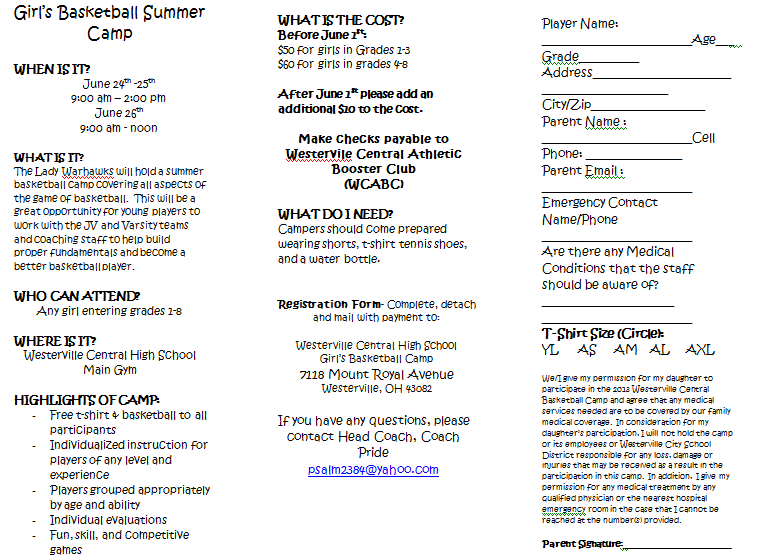
This tri-fold template provides a ready-made three-panel layout for presenting business, product, service, event, or promotional information. The panels can be customized with headings, descriptions, images, contact details, and calls to action.
Use the template as a starting point and organize the content according to the brochure’s purpose. Keep important information away from fold lines and page edges so it remains readable after printing and folding.

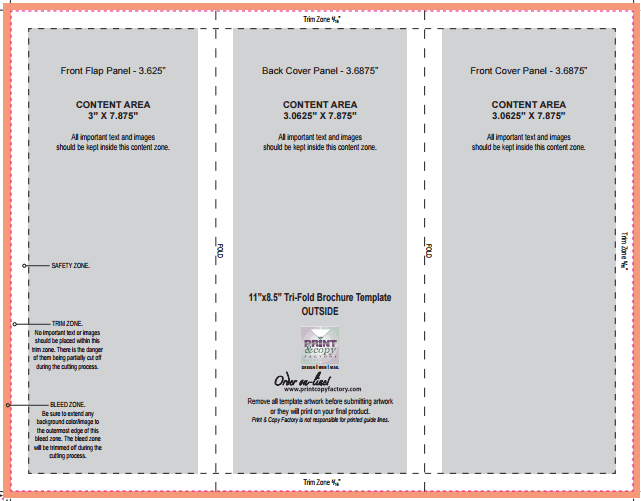
This tri-fold template offers another layout for creating a compact brochure with multiple content sections. It can be adapted for businesses, events, products, services, schools, organizations, and other promotional uses.
Customize the text, images, colors, and branding to match your project. Print a test copy before producing the final brochures to confirm that the panels fold correctly.
FAQs
1. What is a tri-fold brochure?
A tri-fold brochure is a document folded into three panels, providing multiple sections for presenting information, marketing content, images, and contact details.
2. Can I create a tri-fold brochure in Word?
Yes. A tri-fold Word template can be customized with text, images, headings, colors, logos, and contact information.
3. What is a tri-fold template?
A tri-fold template is a pre-designed layout that helps you create a three-panel brochure without building the page structure from scratch.
4. What can a tri-fold brochure be used for?
Tri-fold brochures can promote businesses, products, services, restaurants, events, real estate, schools, nonprofits, and other organizations or activities.
5. Can I print a tri-fold brochure at home?
Yes. You can print a tri-fold brochure using a home printer if the page size, orientation, margins, and printer settings are configured correctly.
6. How should I arrange information on a tri-fold brochure?
Divide information into logical sections and give each panel a clear purpose. Use headings, short text, images, and sufficient spacing to improve readability.
7. What paper is best for a tri-fold brochure?
The best paper depends on the purpose. Standard paper can work for simple handouts, while heavier or higher-quality paper can provide a more professional result.
8. Should I test-print a tri-fold brochure?
Yes. A test print lets you check the folding order, panel alignment, margins, images, and readability before printing multiple copies.

You must be logged in to post a comment.