

Use these sales report templates to review sales totals, targets and representative performance. Compare 5 downloads below, then choose the file that fits your task.
Choose a Download
| Resource | Format | Download |
|---|---|---|
| Weekly Sales Report Template | Excel | Download Weekly Sales Report Template |
| Monthly Sales Report Template | Excel | Download Monthly Sales Report Template |
| Sales Rep Performance Report | Excel | Download Sales Rep Performance Report |
| Daily Sales Report Template | Excel | Download Daily Sales Report Template |
| Annual Sales Report Template | Word | Download Annual Sales Report Template |
For the next step, compare financial report templates & examples and progress report templates.
What Is a Sales Report?
A sales report summarizes sales activity over a period, such as a day, week, month or year. It typically shows revenue, units sold, targets, performance by product, region or salesperson and trends over time. Managers use sales reports to see what is working, spot problems early and plan next steps. A sales report template gives you a ready-made structure and, in Excel, automatic calculations and charts, so reporting takes minutes instead of hours.
Contents of sales report template
Large number of companies totally depends on sales to generate incomes and sales force can make or break the company that is the reason experts always recommend sales report making to have an idea about performance of the sales team or individual sales person. A sales report may include contents like complete details about calls made to customers for sales, generated sales leads, successful sales transactions, pending sales and total revenue generated via sales in mentioned timeframe etc. Timely prepared and detailed sales reports enable sales manager or higher authorities to track how much time sales force is spending on different sales activities and how well they are going towards assigned targets.
Sales reports play a vital role in overall productivity and also help sales people to eliminate sales related issues and problems on immediate basis. Sales report prepared by an individual sales person provides complete picture of his or her day spent for sales. Sales report template is a well known and handy document that lets a sales manager or individual sales person to prepare sales report in fewer minutes. It not only saves time but also gives the report a professional appearance.
Free Sales Report Templates in Excel and Word
This page offers five free templates, four for Excel and one for Word:
- Weekly Sales Report Template: Excel (.xlsx), 1 worksheet, with built-in formulas that calculate automatically.
- Monthly Sales Report Template: Excel (.xlsx), 1 worksheet, with built-in formulas that calculate automatically.
- Sales Rep Performance Report: Excel (.xlsx), 1 worksheet, with built-in formulas that calculate automatically.
- Daily Sales Report Template: Excel (.xlsx), 1 worksheet, with built-in formulas that calculate automatically.
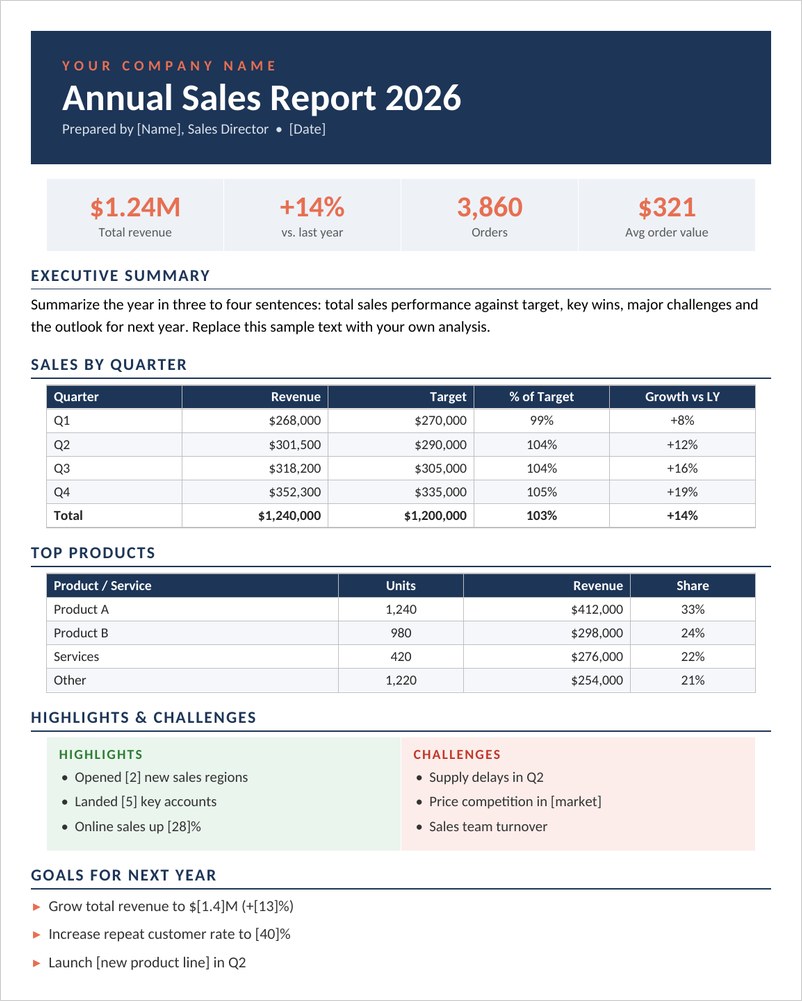
- Annual Sales Report Template: Word (.docx), 1 page.
Enter your figures in the Excel templates and the totals, targets comparisons and charts update automatically. The Word template is for a written annual summary for owners, managers or a board.
Types of Sales Reports
- Daily sales report: each day’s sales, discounts and payment methods, useful for shops.
- Weekly sales report: daily sales by product with weekly totals against targets.
- Monthly sales report: revenue, targets, variance and year-to-date figures.
- Sales rep performance report: compares salespeople by revenue, deals and quota.
- Annual sales report: a written review of the year with results, highlights and goals.
- Product or regional reports: results broken down by product line or territory.
Key Sales Metrics to Track
- Total revenue and units sold.
- Sales against target and the variance.
- Average order or deal value.
- Number of deals won and win rate.
- Quota attainment for each salesperson.
- Top-selling products or services.
- Year-to-date totals and growth compared with prior periods.
Choose a small set of metrics that match your goals; too many numbers can hide what matters.
How to Write a Sales Report
Start by deciding who will read the report and what decisions it should support. Collect accurate data from your sales system, point-of-sale or spreadsheet for the period, then enter it into the template. Check that totals match your records.
Next, look at the results against targets and previous periods. Add a short summary that explains the main results, what drove them and any challenges, then finish with clear actions or goals for the next period. Charts help readers see trends at a glance, which is why the Excel templates include them.
Tips for Better Sales Reporting
- Use the same template and period every time for easy comparison.
- Report on time, on a regular schedule.
- Explain big changes rather than only showing numbers.
- Keep the summary short and put detail in tables.
- Share reports with the people who can act on them.
Downloadable Sales Report Templates And Formats
Download these original sales report templates for Excel and Word. The Excel reports calculate totals, targets and charts automatically as you enter your numbers.
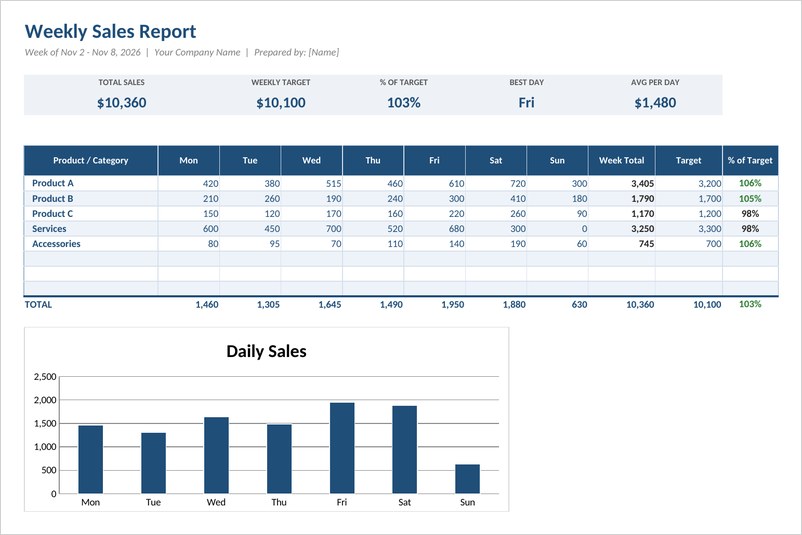
Weekly Sales Report Template (Excel)
A weekly sales report for Excel with daily sales by product, week totals, targets, percent of target, KPI cards and an automatic daily sales chart.
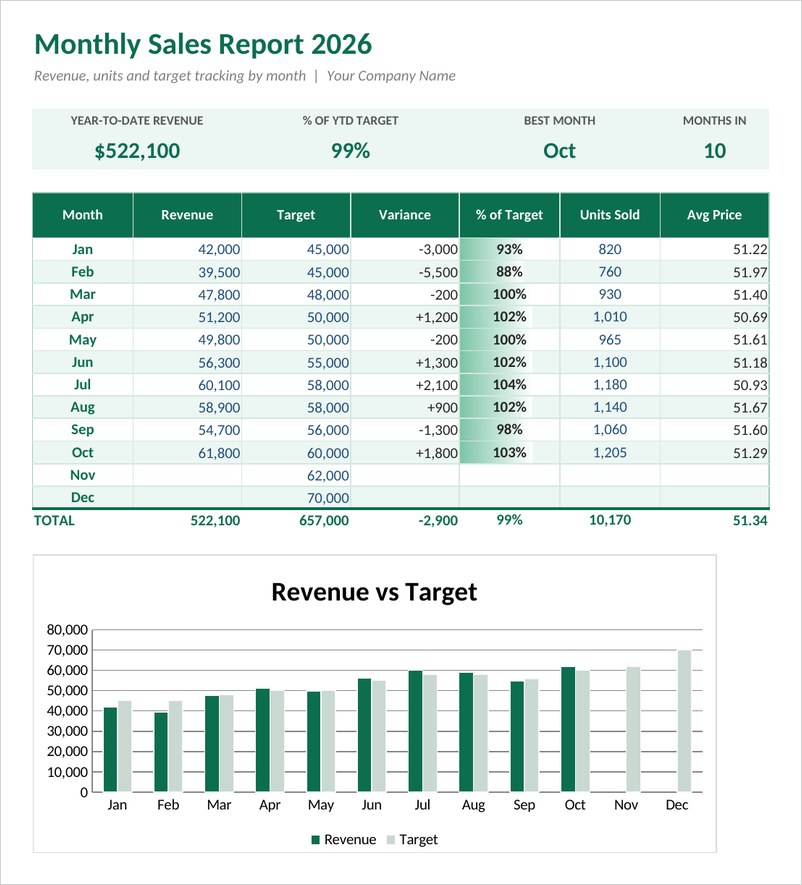
Monthly Sales Report Template (Excel)
Track revenue, targets, variance, units and average price for every month, with year-to-date totals, data bars and a revenue versus target chart.
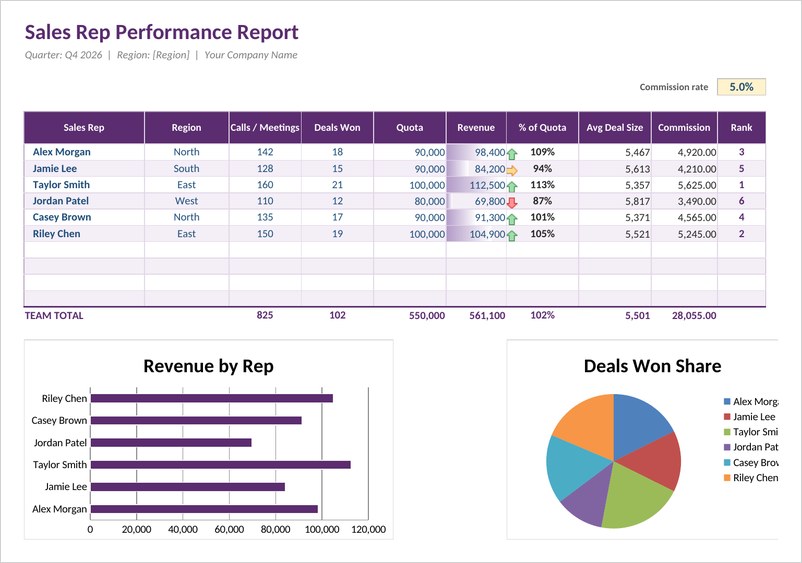
Sales Rep Performance Report (Excel)
Compare sales reps by revenue, deals won, quota attainment, average deal size and commission, with automatic ranking, arrows and charts.
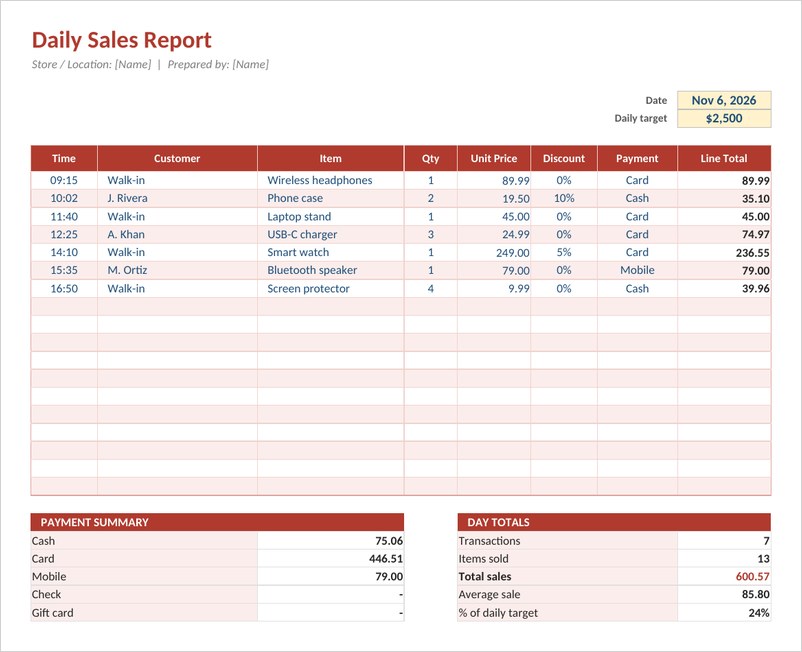
Daily Sales Report Template (Excel)
A daily sales log for shops and stores that totals each sale with discounts, summarizes payments by method and compares the day to your target.
Annual Sales Report Template (Word)
A professional annual sales report in Word with key figures, executive summary, quarterly results, top products, highlights, challenges and next-year goals.
Frequently Asked Questions
What should a sales report include?
Revenue, units sold, results against targets, performance by product or salesperson, trends and a short summary with next steps.
How do I make a sales report in Excel?
Use an Excel sales report template, enter your sales figures and let the formulas calculate totals, variances and charts.
How often should sales reports be prepared?
It depends on the business. Shops often track daily, teams commonly review weekly and monthly, and owners review annually.
What is quota attainment?
It is the share of a salesperson’s target they have achieved, used to compare performance across a team.
Can I use these templates for a small business?
Yes. The daily and monthly templates suit small shops and businesses, and all five are free to edit.


You must be logged in to post a comment.